Understanding Google Places & Local Search – Developing Knowledge about Local Search

August 9, 2012

Are Rich Snippet Reviews Making a Limited Comeback in Local?

Category: Google Places (Maps & Local) – Mike Blumenthal 4:48 pm

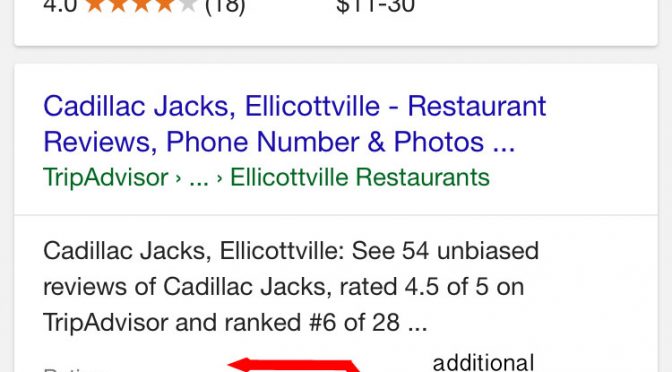
I am once again seeing semantically marked up pages shown with review stars in the search results . However the frequency of their display is very limited compared to earlier in the year. Summary review stars from the home page, which were wildly abused, are not visible but review stars are visible on this testimonial page.

Google’s displays come and go but rich snippet formatting of local web pages for reviews, location, authorship and publisher makes sense as a standard practice.

August 8, 2012

Is Google Thinking About Abandoning the Zagat Rating System?

Category: Google Places (Maps & Local),Reviews – Mike Blumenthal 5:14 pm

Matt Gregory, a local SEO in Minneapolis, recently sent me these screen shots of an obvious test that Google is conducting to assess the relative merit of stars vs. the Zagat display for reviews in the main SERPS. He has been seeing these results on Safari for the Mac consistently from Monday evening through today on a broad range of searches. I have not been able reproduce the results but the fact that they were visible to him over such a long period time indicates that the results were not a fluke and are likely part of a larger test.

These results lend themselves to speculation. The recent change of review presentation to the Zagat rating system from the 5 star system was jarring to say the least. Minimally the local results with reviews became less visible in the search results and some folks like Matt McGee think that they are difficult to understand by the consumer/SMB and are a big risk for Google.

Marissa Mayer was the person that was most involved in the Zagat purchase and she noted at the time:

“Did you know there’s a place in Menlo Park near the Safeway that has a 27 food rating?” one of my friends asked me that about two years ago, and I was struck because I immediately knew what it meant. Food rating… 30 point scale… Zagat. And the place… had to be good. With no other context, I instantly recognized and trusted Zagat’s review and recommendation.

A well known foodie, Mayer was obviously taken with the Zagat system. She was in charge of Google local when the Zagat review system was implemented and one can surmise that it was her “baby”. With Mayer leaving the company it is entirely possible that there is no longer a strong internal advocate for the Zagat system.

Obviously not everyone at Google thought the the Zagat display was the best choice as Adwords retained the stars. And it appears that someone in Google local search must agree with them.

In addition to the change back to stars, note that the large map is included in the main body of the serps and not off to the side and third party reviews are once again given front page visibility. Apparently the rollover to the full listing content appearing to the right is MIA as well. This layout also obviously frees up advertising space in the right column.

What do you think? Will Google abandon the Zagat display after only 2 months of use?
(more…)

What Should You Tell A Client When Google Loses Their Reviews – A 4 Part Plan

Category: Google Places (Maps & Local),Reviews – Mike Blumenthal 5:00 am

With the recent surge of complaints about “lost” reviews in the forums, Google acknowledging that there were a number of reasons that a review might be tagged as spam and that the car industry in particular was being scrutinized, I thought it might make sense to rerun this May article about coping with lost reviews. If you feel that you have suffered unfairly at the hands of Google’s review spam filter, please report your issue to Google in this post in the “help” forum.

Google continues having technical issues with losing reviews (here is my first report from August 2008 of them being lost – the issue goes back quite a ways.) particularly when the CID of a listing changes due to a merge. Also they seem to be tightening down what appears to be a relatively unsophisticated spam algo (first confirmed in November 2010)  that is catching a number of good reviews with the bad.

Don Campbell, amongst many others over the past few days, asked me what to tell rightfully upset clients that lose reviews from their Google Places page.

Here is what I do when I have a client that has lost reviews:

1) Educate the client: I refer people to this Google authored article, Having technical issues with the reviews on your listing?  In it Google outlines most of the issues as to why reviews go missing. The issues range from spam abatement to Google simply losing them in certain situations. Google notes that in most situations there is often little to be done even by The Google themselves until the issues are fixed and appropriate tools are developed on their end. (In fact it really make the most sense to educate your client BEFORE they lose reviews so that they know what to expect and when it does happen you are not the one that they take their frustration out on.)

2) Provide a dose of humor and reality: Since there is not much a client or SEO can do, I also provide them with the 6,6,6 rule for lost reviews to guide them as to what to expect in terms of recovery of the reviews. It might offer some small comfort.

What is the 6,6,6 review rule? (any client imagined thoughts about the devil suggested by my guideline are actively encouraged)

If reviews don’t come back to the Google Places page in 6 days, they might return in 6 weeks

If they don’t return in 6 weeks they might return in 6 months

If they don’t return in 6 months they have descended to Dante’s 6th Ring of Hell

3) Encourage them to stick with the plan: Regardless of what Google is doing (or more likely not doing) in regards to reviews this week, the best tactic is to keep on truckin’… continue to get more reviews ethically at both Google AND 3rd party sites. I know it is hard and discouraging when difficult to obtain reviews are lost but neither the client (nor we) can control what Google does. The client can, in the end, only control what they do. It is better to have some reviews rather than none. A steady stream of reviews at the review sites will guarantee that the business has a solid review base no matter what and no matter whether Google has lost ‘em again.

4) Advise the business to take control of their own destiny: (Contributed by Jacob Puhl) With the realization that some percentage of reviews will likely continue to disappear, the client should take it upon themselves to make copies of the reviews they do recieve at Google. If the reviews do disappear, repurpose those that disappeared as testimonials on the client web site. In the same vein, implement hReview/Schema.org formatted testimonials on your site to highlight these “lost” reviews so that there is the chance of getting the additional review stars in search. Be sure that the testimonial page has enough prominence that there is a chance that it will be used by Google as a review page.

Reviews are hard to come by and painful to lose but just because Google doesn’t have their act together doesn’t mean that your client shouldn’t either. The value of reviews in terms of increased credibility & conversions is too high for the SMB to just give up on the process when confronted with adversity.

August 3, 2012

Step by Step Guide to the Google+ Business/Local Merge Verification Process

Category: Google Places (Maps & Local) – Mike Blumenthal 4:12 pm

Updated Saturday, Aug 4th.

If you already have a Google+ Business page (or create one) then you can now merge that Google+ Business page with your existing G+ Local page by following the new verification procedure.

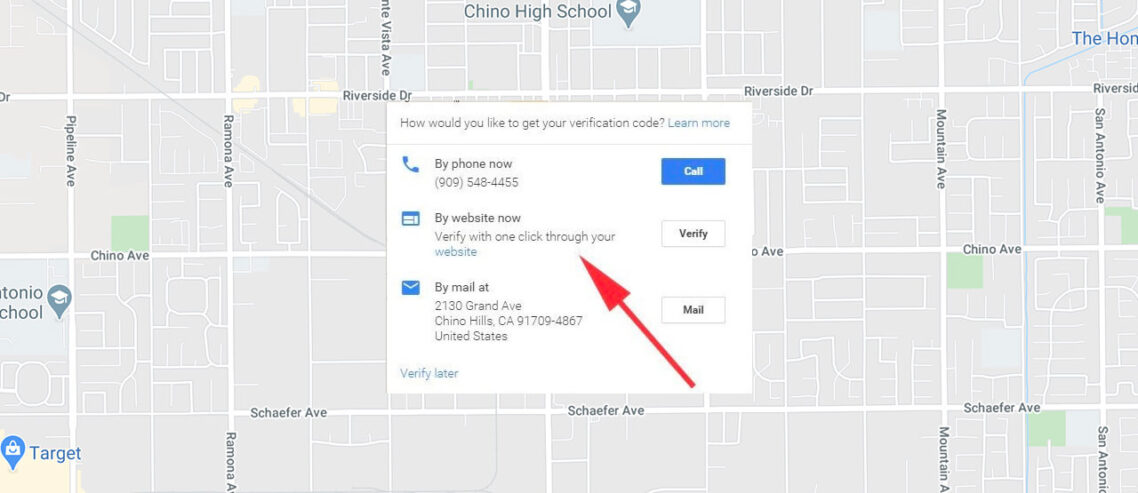
The process is initiated from the Google+ Business page. Any manager of the page can initiate the process which will require postcard verification even if the email addresses match between the G+ Business page and your Dashboard. Apparently, in several months, a more automatic merge will be available to those businesses that have only a Google+Local Page/Dashboard.

Here are the steps to the process:

1. Login in as the manager for the Google+ Business page and make sure that all necessary fields are public. I just ran through this process for Moses and Rooth Attorneys at Law in Orlando. Click on the unverified icon to the immediate right of your business name. A warning will show if you neglected to make any of the required fields available for public view. Fix the non public fields by changing the visibility of the specific fields noted. (Not sure what is happening with the message being blocked- Google has noted that message being blocked is a known bug that is being fixed):

(click to view the rest)

(more…)

August 2, 2012

Keywords Not Provided Passes the 60% Mark

Category: Google Places (Maps & Local) – Mike Blumenthal 8:16 am

If there is still any doubt that keyword detail will completely disappear at some point in the very near future my monthly analytics should dispel it. The analytics for my blog indicate that over 60% of the keywords are no longer provided.

While my blog has a more technical readership than many sites and the users have very high adoption rate of Chrome and Firefox, it is provides strong directional indication of what will happen on most sites in the coming months.

July 31, 2012

New Local Search Result Display – Google Upgrades the Plus Box

Category: Google Places (Maps & Local) – Mike Blumenthal 4:19 pm

Joy Hawkins has spotted a new type of local display showing for the search Flushing Auto Insurance where additional results are pinned but NOT numbered.

Joy hypothesized that the result is a function of rich snippet formatting of the address being on the website. That however does not appear to be the case as neither site seems to have rich snippet information. Actually the more I look at the example that Joy is showing of the before and after, what I think we are seeing is a new more obvious Plus Box display. These typically will use reliable web based address information but it need not be rich snippet in nature.

I am curious if you are seeing these types of results on other searches? Is it a test? How widely visible is it? Let me know.

Update: Once I realized that this is likely to be a new type of Plus Box Display, I searched results that have in the past returned the Plus Box and saw this new type of result:
(more…)

July 30, 2012

Google+ Local And Review Issues

Category: Google Places (Maps & Local),Reviews – Mike Blumenthal 3:07 pm

Since the rollout of Google+ Local the complaints about missing reviews have risen dramatically in the forums. The issues that Google have had right along with losing reviews remain much the same and reviews can go missing for many of the same reasons:
- Marked as spam
- They are misplaced by Google briefly or for longer periods
- Users mark their review as private in the transition to PLus
- A listing has dupes and the review gets associated with the other listing
- A rating will show in the review count but not in the review corpus

But apparently something has changed. In conversations in the private forum Google noted the following high level points regarding spam that we could share and that may make life easier for some of you:

- car dealership reviews are usually, but not always, spammy
- Google will only allow one review per person per business
- Copy pasting the same review for multiple locations is also not allowed (Google will delete both instances of the review)
- Putting URLs in reviews will result in the review being marked as spam

July 24, 2012

Google and Your Business forum wrapup – July 19, 2012

Category: Google Places (Maps & Local) – Mike Blumenthal 2:46 pm

Executive summary: A bug fix again, a new bug and a new, old bug reappears. 2 Steps backwards and 1 step forward for the second time. Progress is hard to come by.

The details:
1- 00:24 A Bug fix- The analytics are once again visible in the dashboard. The is a new fix of the same problem as several months ago. Or is it an old fix for a different problem… I am getting confused

2- 00:52 A New bug- Editing a single listing in the location manager (bulk listings) can lead to weird behaviors on the Google+ page.

3- 1:10 A new old bug- Some businesses are once again are intermittantly unable to leave review responses. This feature sometimes never works especially when a listing has been claimed more than once but now it is even more random than ever

July 11, 2012

Procedure for Reinstatement of Removed “We Currently Do Not Support” Locations Still Not Available

Category: Google Places (Maps & Local) – Mike Blumenthal 1:43 pm

Google For Business Community Manager Jade W has just posted this sticky note in the forum:

Hey all,

The troubleshooter under “My listing has incorrect information” for Google+ Local support (http://goo.gl/6RYFm) is currently unavailable. It’ll be back in about a week.

In the meantime, the support team’s working hard to go through the previously submitted requests. We’re also working on revamping and improving some of the troubleshooting processes we’ve got in place.

Don’t worry — the rest of the troubleshooter and the main channel for reporting incorrect information are still available. Here’s the deal:

1.) Listing is live but has data issues/incorrect information? Go through Report a problem on Google Maps or Edit business details on Google+ Local. Requesting data changes through these channels is not automatic — they are all reviewed — so don’t expect to see an immediate fix.

2.) “Do not support this location” issue? These listings will have a chance to be reviewed and reinstated, working on getting a better process in place. For now, review the quality guidelines and make sure the listing complies. Give it a poke and wait a few days. Keep an eye out here for when the support team is available again.

3.) Verification issue? Go through the troubleshooter as always — that part is still available (http://goo.gl/6RYFm).

I’ll update this post with more information as needed.

Thanks,
Jade

Clearly, Google is struggling with handling the problems created by the move to Google+Local and the self inflicted problems caused by the “We Currently Do Not Support” take downs. For those of you that were improperly taken down the comments above hold out some hope but nothing very soon. For those of you that have been merged or have the wrong reviews, you will have to wait until Google catches up.

July 3, 2012

Best Practice For Your Google Listing- Record the URLs from +, Maps and MapMaker

Category: Google MapMaker,Google Places (Maps & Local) – Mike Blumenthal 9:10 am

MapMaker, despite its bugs and quirks, has taken on an ever increasing role in the health of your business listing in Google. Being able to find and edit the listing in MapMaker has become critical.

Last week in Dan Austin’s post: A Step By Step To Recover Your “We Currently Do Not Support This” Location in MapMaker he noted that it was a best practice to record your listing’s url in Google+, Google Maps and Google MapMaker. Having these handy in times of trouble will facilitate diagnosis and repair if your listing goes south. 

I wanted to highlight his suggestion in its own post so that the recommendation achieved the visibility it deserved. Here are the steps to obtaining this critical information for your listing:

1- From the Places Dashboard click on “view” from the analytics page or “See your listing in Google Maps” from the locations page and it will take you to the Google+ URL & number that will look like:

https://plus.google.com/102992615806778826953/about?gl=US&hl=en-US

Which can be shortened to:
Google+ Local URL: https://plus.google.com/102992615806778826953/

2- From Google Plus Local page click on the Map Pin for the listing and it will take you to Google Maps and give the Maps URL and its CID:

https://maps.google.com/maps?ie=UTF8&cid=9198701853947205333&q=South+Towns+Surgical+Associates+-+Alvarez+Julio+A+MD&iwloc=A&gl=US&hl=en-US

Which can be shortened to:
Google Maps URL: https://maps.google.com/maps?cid=9198701853947205333

3- You can then take the CID from that URL and insert it into the following Mapmaker url: “http://www.google.com/mapmaker?gw=90&cid=”
to create the MapMaker URL for the listing:

Google MapMaker URL: http://www.google.com/mapmaker?gw=90&cid=9198701853947205333

With this information you can communicate clearly to Google Places for Business support and as Dan noted “If you have that info, then almost any POI [in MapMaker] is recoverable and editable, no matter what it’s status”.