Understanding Google My Business & Local Search

Google Adds Slideshow Option to Place’s Photos
Google has just announced on the Lat-Long Blog that images on a Places Page, whether uploaded by the owner or included via Panoramio, are now viewable in a slide show mode. From the Lat-Long blog:
Today, we’re offering you a better, more streamlined way to view these photos. With this new feature, you can easily flip through a whole collection of photos and find the sites on the web that have relevant pictures of a given place. Photos that have been uploaded by our Panoramio or Google Places users will appear in high-resolution as an overlay when users click on them. For photos from other sources, you can easily click on a specific photo to see more and visit the site it comes from.
This simple and intuitive online album experience makes it easier to explore all the wonderful photographs of places all over the world.
The album like slideshow is invoked by simply clicking on any one of the photos on the Place Page. While in this mode, the Places Page is used as a dimmed backdrop and the viewer is allowed to move easily from one enlarged view of the photo to another. The only option available to the viewer are to close the show or report the photo as inappropriate.
The slide show is not exposed in the Local Universal results on the main page search results and requires at least two clicks before you can see it. Thus, as currently designed, it is unlikely to get much viewership. There are no options to embed the slide show on your website and no link directly to the slideshow is provided.
All recent enhancements to Places have several things in common; trying to keep the user in Places or move them to another Google product. This has been true on the desktop and in mobile with many changes affecting both simultaneously. Google obviously has an eye on increasing user engagement and page views so as to increase visitor loyalty and to be able to deliver more ads. This upgrade, while desktop only at this point, focuses on the engagement side. It is unclear when and what form it will take for mobile.
It is understandable that once Google has you this far into Places, they want to keep you there via this new feature but it would also make sense for Google to provide an ability to present the slideshow via an embed option or a direct link as well.
(click to view larger)
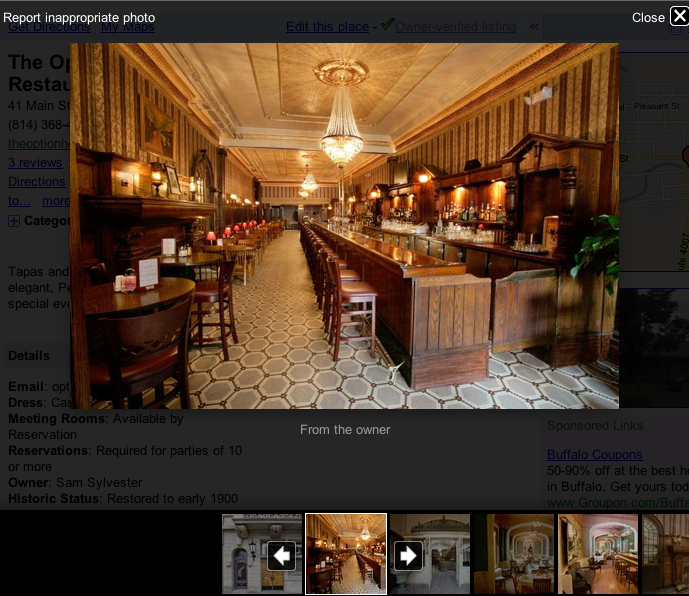
If you click through to Places page for the Option House Restaurant and click on an image to go thru the slide show it becomes obvious why it now makes sense to upload photos at the maximum size allowed by Google Places (less than 1MB and 1024 x 1024 pixels).
Interestingly, when there are photos from other sites (not Panoramio or Google), they show at the end of the slideshow in thumbnail form with an option to expand them. However, when clicked they spawn a new window for the 3rd party site. Sheesh… did anyone say portal?
You can see this in action at this Places Page:





© Copyright 2026 - MIKE BLUMENTHAL, ALL RIGHT RESERVED.
Comments
12 Comments
Hopefully an embedded YouTube player for for the videos page is next.
@David
Yes it was odd that the video’s were not included in the slideshow somehow. Could be that they just want to keep you on a Google property a tad longer so from Google’s POV an image slideshow is just as good as a visit to YouTube 🙂
[…] (Hat tip to Mike Blumenthal for the alert on his blog.) […]
I really like this new feature. I am also confused why there is still no video as well. That is definitely something I would like to see.
[…] For more discussion see Mike Blumenthal’s post. […]
@Sarah
Yes, given that they control YouTube video it is unclear why it wasn’t included.
It’s somewhat of a handy feature… but I really wish they’d exert more resources to tidying up the spam than adding frills like this.
Andy 🙂
@Andy
You and every other rational user of Places but no Google is putting the “customer first”….:)
Just trying to add some photos to Places (using the “Add a photo from web” option) & keep getting the following error message: We are unable to verify that this is a valid image or it may be too large.
I’m posting the full URL with http as it suggests. Was originally trying it from my blog & when kept getting error tried one from Flikr just to see if was an issue exclusive to my blog, but same error message.
Anyone else have this problem or have any suggestions? Thanks.
@Larry
1)be sure that the images are smaller than the size mention
2)try some browser other than IE
3)Wait a day as Google has been having hiccups
Thanks Mike, switched over to Firefox & that did the trick!
Hi Mike,
I have just noticed an update to the slide show and posted on my blog
http://www.crunchwebdesign.co.uk/blog/?p=32
Whats your thoughts on this? It seems a new addition at least in the UK.
Comments for this post are closed.