Understanding Google My Business & Local Search

Local SEO Planning Tip – Determine The Geo Limits of a Search
Local Search folks don’t always agree on the factors that affect rank but there is one search relevance factor on which there is strong agreement: A local business listing must be in the city of search in order to even be considered on a given service + city query.
While there is a general idea about how Google determines the boundaries of the polygon that defines any given city used in a search, it is never easy to determine exactly where the boundaries for any given geography are. While the distance radius that Google will use to rank businesses also seems to depend on business density and industry, it would be useful to know the outside limits of the boundaries defining any city or town used in the search.
Does that new client in Scottsdale have a chance to rank in Phoenix? Is the business in the burbs just too far on the wrong side of the tracks or can they be ranked in the principal city with a strong enough local presence?
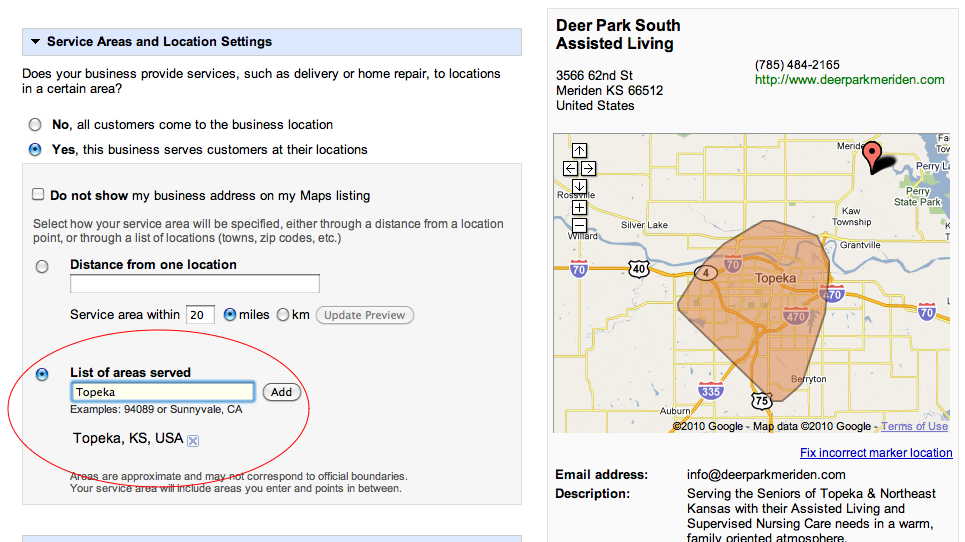
Wouldn’t it be nice to know, going into the meeting whether there is a snow balls chance in Phoenix of success? It has always been difficult to know exactly how Google Maps drew the polygon boundaries for any given geographical area but with the new service area feature available in the Google Places management area, we now have a solid guide.
To determine the likely boundaries for any given geography simply select (temporarily) the “Yes, this business services customers at their locations” in the edit listing area of your Google Places management area(LBC). Enter your primary search area target in the “List of areas served” field and Google Places then draws the polygon that defines the boundaries of that particular area. As you can see from this graphic, and as I learned the hard way (a long time ago), Deer Park South will not rank on a search for “assisted living Topeka, KS” no matter how strong the listing is. (Click to view larger)




© Copyright 2026 - MIKE BLUMENTHAL, ALL RIGHT RESERVED.
Comments
30 Comments
Interesting. I have certain search terms (city + service) which a client has shown up in where the company is definitely not in the geographic region that appears when I do this test. I’ve also seen competitors show up in local search queries where there listed address in the results is quite obviously not in the city (or defined area).
Am I misunderstanding something? (probably)
I hadn’t played with the service areas portion of the profile page simply because of all the issues I heard when others had reported a huge loss in rankings as a result of it. This is a great “common sense” idea though that I had not really considered, thanks!
@Martha
There are a number of things that factor into the results shown on any given search. If a business has a very low prominence and is “untrusted” Google may look farther afield to answer a query. In certain low density industries they do the same. The variables are more complex that just the polygon shape of the metro area. So one needs to do industry and local specific research to fully understand the many parameters….this is but one of them
@Taylor
I hope to do a post on service area in the next week.
Mike — Yeah, I kind of figured that was the case. 🙂 The place where I see Google going really far afield is on pretty long-tail search terms. The tricky thing is explaining this to customers — they see a competitor getting listed for a city where they have no physical location and they want the same thing for themselves. It’s hard to explain that tuning for their actual city is a whole lot more feasible/predictable than trying to get them into another city. It *could* happen, but there’s very little I/they can do (legitimately) to make it happen.
So would you recommend that we use this feature or are people reporting a loss in rankings? I already have a pretty good ranking for my medium-sized city but would this allow me to show up in the listings for the large city next to me?
[…] My favorite blog post this week has to be Local SEO Planning Tip – Determine the Geo Limits of a Search, posted just today by Mike over at Blumenthals. I used it to take a look at a client’s Google […]
[…] Local SEO Planning Tip – Determine The Geo Limits of a Search, Mike Blumenthal […]
@Nick, I think you have a chance to get listed up in the listings for the large city next to your city. On of my friend has used this feature and now listed for the local business listing of a city near to him.
Hi Mike – You caught my attention as this was a means that I had never considered. However, upon looking at four metro areas, I simply don’t find this to be an indicator. In two cities, more than 50% of the metro area within the beltway was not included in the “city” config. More importanly, a high perentage of the local businesses in the top 10 Maps search results were located outside “city” geo modifyer.
@Jim
I have not “ground tested” this idea. There are certainly a number of variables not the least of which is that Google may be defining this polygon differently for the LBC than for the organic results or Maps. The others obviously being industry type and industry density which are obviously factors.
In a theoretical sense if we for the sake of simplicity assume that it is the same polygon then it would be interesting to measure this across a range of more and less dense industries to see how well it correlates.
I would love to know more about the specifics of your searches…size of the cities, what industries, how dense was the competition etc
I configured three midwest cities, Dayton, Cincinnati and Indianapolis. Because I am most familiar with Cincinnati, I noticed that the config was very close if not exact to Cincinnati Incorp limits as opposed to MSA, county or zip code config. My point here is that there are a number of other incorporated areas within what I would consider “cincinnati” as opposed to Indy where the config is almost a perfect square and where the area is more to how one would define the city limits. So in Cincy, the high volume category and keyword, hair salon, 7 of top 10 results were outside config. “home care”, 6 out of top 10 outside. Obviously density is also related to search term within category – example air conditioning versus geothermal heating.
@Jim
In the patent Google defines boundaries with a zip code aggregation method.
The boundary that they are now showing in the LBC could very well come from the new data that they are using from their changeover away from TeleAtlas and their increased use of government maps and not the zip code boundary that the patent indicated that they are using in the search results.
[…] Read this article: Local SEO Planning Tip – Determine The Geo Limits of a Search … […]
@ Martha…I have the same situation with quite a few clients who live in the outermost “burbs” wishing to have powerful rankings with the heart of say Dallas. They then of course make the same argument you are hearing as well about how the competitors show in that area with no real location. That is why I have resorted to declining the business of those that wish to have “locations” in other cities they don’t reside in. Between the amount of efforts convincing Google that the listing is in fact legitimate in combination with the outright non-ethical practice of doing so….its just not good business. Those listings are almost subject to being reported by real service providers who recognize the location to not be owned by said company…maybe it was just an employees house.
Very interesting Mike – thanks 🙂
p.s. The Google Places rep did not get back to me regarding my practitioners/professionals placement question as she promised from the Places webinar… oh well.
@Andy
You are ever optimistic. 🙂
Thanks for this post Mike – I’ve got a client’s listing which I’ve now found out is not within the desired boundary, so at least now I have a bit of an explanation if it doesn’t show in results.
Hi Mike, Great post as always. I’ve been using the new list of areas served for a client and it seems he’s ended up in a “no mans land” when it comes to where google locates him, so he’s close to a lot of areas but not close enough to be competitive in the rankings. Do you think it might be best to use the distance from one location tool so he at least becomes competitive in one area and hopes for the best in the others?
Gareth
My approach is to do the best you can in the area that he is in…some variables like industry density are out of his control but if the record is strong (and not spammy) it will have that much better chance of showing up more broadly
Thanks Mike, appreciate it.
Very interesting info Mike. I’ve been doing Local SEO for small businesses in Ottawa and Toronto. Your tips will come in handy. Any tips for businesses that cover multiple cities but reside in one city (head office in one city but he/she travels to multiple locations to do business)? If they have two postal codes/addresses, would you suggest claiming both those locations as the same business? What are you thoughts? Insights? Thanks!
@Jackson
I am a big believer in creating a long, term sustainable presence for a business. That is always best achieved by staying within the guidelines.
It is not totally clear to me, whether the business has two legitimate locations or not. And if not why they have two postal addresses. But if the second location is not a real, drive to location you run the risk of being reported to Google. If you are reported, then you run the risk of suspension.
If that is the case, it is not for me to say to you and the client that it isn’t worth it. You need to make that assessment yourselves.
Thank you for the reply Mike. I am also a believer that displaying accurate information on the web is crucial to build a strong relationship with your customers (or potential customers).
Both locations my client work out of (in two different cities). They are both legitimate locations. Most of the time though, he goes to his client’s locations, or sites to do the work (he is a photographer). Would it be best to use the Service Areas feature? I’ve been reading a lot of ‘bad’ things about it lately, any pointers you can give? Thanks 🙂
SErvice area is not bad in and of itself. It seems to have little impact one way or the other.
In the US, if you choose “Do not show my business address on my Maps listing” in addition to service area THEN you will most likely be buried from view. The reports out of Canada indicate that listings are not buried as badly up there. The impact of the choice though is instant on and instant off… ie if you choose “Do not show my business address on my Maps listing” and your listing disappears on a certain search… changing it back will immediately restore it.
Hi Mike,
Thanks for this, very interesting. Though doing some research I have found out the post below. Am I correct in saying that it would seem your mind has changed or am I getting confused. If so, do you have any specific reasons why you’ve evolved 🙂
http://www.davidmihm.com/local-search-ranking-factors.shtml#57
Thanks, H
My position is the same then as now. This tool just provides you with a very broad clue where you are likely to rank well. I am suggesting using the tool to understand how Google understands a specific geography.
Everybody thinks that it is important to have your listing inside the city of choice: http://www.davidmihm.com/local-search-ranking-factors.shtml#2 and the use of the tool mentioned above gives you a clue of the possible boundaries of that.
As to whether you should id your service area… I think it is valuable to do regardless as it helps clients understand where you do what you do. I don’t think that it helps rank very much but so what?
[…] 9- Local SEO Planning Tip – Determine The Geo Limits of a Search […]
I remember you visited this subject last year. I have to respectfully disagree with you that this is a reliable method for making this call. I just ran a test for Dayton OH. A query for “carpet stores dayton”, certainly a moderate to high populated category for locations produces 6 of the top 10 (places) results out of the default configuration for Dayton. And there are plenty more examples.
Jim
Between last year and this year a lot has occurred. The big change was the rollout of Places Search in late October. In that Google is not letting the web define how far out a particular result should show not just a limited postal geography.
Interesting read. I have tried a few examples using (city + service) searches for a few of our clients and Google does not serve some business listings as the business is further away from the city centre compared to some of their competitors.
Comments for this post are closed.