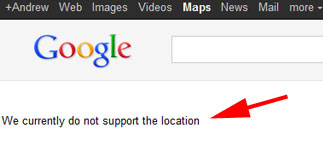
When working in Places the message that we all dread to hear: We do currently do not support the location is a Google message that instills the fear of god in the most expert of us. In normal situations it will show when a newly created listing has not yet been integrated in the Maps index. Give it 48 hours and the message goes away.
However there has been a more sinister occurrence where it will show up all of the sudden on a long claimed and stable record and it’s the bane of who ever runs into it . Until now it was not known what caused it or how to fix it. It is a message that shows up all too often in the forums raising its head there 3 or 4 times a week.
Fortunately for all concerned, a frequent contributor to the German Places Forums, Spinatmensch has discoved a work around for this most devastating of Google Places Bugs. Here are the instructions as detailed by EHG, another frequent contributor:
I have tested this recently with Andrew Baker whose Places Page was experiencing the problem. This solution may actually recover some of the listings that were edited during the Pending problem as well.
A hat tip and a huge thanks to EHG and Spinatmensch for solving this problem!


Hi Mike,
In fact, This method is good for any of the weird Google Places statuses, such as Active status without a dashboard in the account & listing is OFF line, Active status without a dashboard in the account & listiing is ON line, etc..
We’ve ‘released’ couple of listings with the same method 2 weeks ago & it’s working perfectly.
I guess that after Google will read this post we’ll have to find another work around for such problems.
Local IS fun!
Yam
Comment by PureSheer (134 comments) — July 25, 2011 @ 4:18 pm
@Puresheer
So you’ve been holding out on me eh?
Comment by Mike (2500 comments) — July 25, 2011 @ 4:22 pm
Happy to help Mike, great that it worked instantly.
Top tip!
Comment by Andrew Baker (10 comments) — July 25, 2011 @ 4:26 pm
That was the 1st & last time! Promise!!
Comment by PureSheer (134 comments) — July 25, 2011 @ 4:28 pm
Forgot to say thanks to Michele, here at Coinso’s Local Killers team, for cracking it up almost 2 weeks ago. I can’t take the whole credit for it.
Comment by PureSheer (134 comments) — July 25, 2011 @ 4:43 pm
Nice tip! Someone today in our mastermind group said the same thing. I didn’t know that specifically was the fix, but in the past I have made some small edits to get GP re-indexed stuck GP listings and that usually worked.
Comment by matthew hunt (77 comments) — July 25, 2011 @ 4:58 pm
I will test this with a few and see if it is the fix and get back with you. Thanks
Comment by Brandon (19 comments) — July 25, 2011 @ 6:04 pm
Pls report back. I understand that it doesn’t work in every situation but when it does it works very quickly.
Comment by Mike (2500 comments) — July 25, 2011 @ 6:22 pm
Mike …’enter any content’…can you please explain that to me? Thanks!
Comment by MiriamEllis (636 comments) — July 25, 2011 @ 7:17 pm
@Miriam
Well it is a field which accepts unstructured wording that will appear on your Places listing. So while you could say: F@?!@@en Google S!@!@s – and it would work, I might suggest a more appropriate “new summer hours” kind of thing that you wouldn’t mind a customer reading.
For whatever reason, adding this additional data forces the Google Maps index to find your lost listing
Comment by Mike (2500 comments) — July 25, 2011 @ 7:27 pm
http://maps.google.com.ua/maps/place?cid=5557538971715282121
i have a problem, theris no specification liki
wifi – yes
parking – yes
how it swich on?
Comment by Kat (1 comments) — July 26, 2011 @ 6:33 am
Is anyone aware of a workaround if the analytics link is not active?
Comment by Matt (43 comments) — July 26, 2011 @ 2:15 pm
@Matt
Is it a new listing?
Comment by Mike (2500 comments) — July 26, 2011 @ 2:30 pm
Its about 5 months old—looks like it got caught up in the latest bugs…been missing for almost two weeks now.
Comment by Matt (43 comments) — July 26, 2011 @ 2:34 pm
Hi Mike,
Got it. I just wasn’t sure if there was a specific type of content that would be best to put or if it could be anything at all. Thanks!
Comment by MiriamEllis (636 comments) — July 26, 2011 @ 2:49 pm
@Matt
No Dash? Listing is off/ on line?
Comment by PureSheer (134 comments) — July 26, 2011 @ 4:15 pm
@PureSheer
Not sure what you mean by the dash…the listing is offline, though I do have a couple others that are showing the same way in the dashboard (with no analytics and no clickable biz name), but are on line.
I’ve found this method has worked in the past to get listings reindexed, similar to what @matthewhunt mentioned—I’ve also had success with creating (or toggling) coupons, and adding (or deleting and then re-uploading) pictures, but I can’t seem to revive this listing no matter what I do.
Maybe time to nuke it and start over?
Comment by Matt (43 comments) — July 26, 2011 @ 7:45 pm
@Matt
I meant dashboard.
1. If the listing is off line & you have no access to dashboard- wait 1 month before nuking as it might come back in the next Google update (low chances).
2. If the listing is off line & you can see dashboard- wait 3 months before nuking it (3 Google updates). You can play with the listing a bit & try to change some details in order to revive it.
3. If the listing is on line & have no dashboard- wait 3 months before nuking it.
In many cases it’s better not to touch it while waiting. What can you do? Local SEO- have reviews (from customers
) & create as many ‘parallel’ listings as possible in many other local verticals. That can trigger your Google Maps listing & bring back from the twilights.
Yam
Comment by PureSheer (134 comments) — July 27, 2011 @ 1:58 am
Hi Mike! Re: the sentence above: “This solution may actually recover some of the listings that were edited during the Pending problem as well.” I’ve known the Pending status to disallow one from being able to click the name of the entry at all (re: your #2 above). When I’ve seen Pending statuses, the only clicks to make on the listings are Edit | Delete | Create an Adwords Express (Boost) ad. Am looking to attempt this workaround for the LA IVF Clinic in Pending status…
Comment by Eric F (1 comments) — July 27, 2011 @ 1:34 pm
The “Pending Problem” I referred to was when several weeks ago, Google tagged a bunch of listings as Pending erroneously. If someone happened to edit their listing during that 1 day timeframe then the listing went into limbo but no longer said pending. So the use case was VERY specific and does not apply to a long standing pending record.
Given the length of pending in your case you may want to recreate that listing in a new account.
Comment by Mike (2500 comments) — July 28, 2011 @ 4:36 am
Just tried this fix for some of those listings edited during the pending process. No immediate results. Going to check back again tomorrow. Either way, great info and thanks as always Mike!
Comment by Zelick (4 comments) — August 1, 2011 @ 5:20 pm
@zellick
Reports back on recovering those lost in the pending fiasco have been decidedly mixed
Comment by Mike (2500 comments) — August 1, 2011 @ 6:08 pm
I just tried this fix after my A spot listing has been buried for the last 2 weeks and so far so good. My listing has reappeared in the B spot on page 1. Now hopefully it sticks for awhile….man you just never know with the big G.
Thanks for the great info!
Comment by matt (43 comments) — August 3, 2011 @ 7:13 pm
@Matt
The Lee Greene Award
You can make a donation to my favorite charity
Comment by Mike (2500 comments) — August 3, 2011 @ 7:40 pm
Mike,
I have a client who’s listing was up and running for several months and ranking very high. Then, about a month and a half ago the listing disappeared and the infamous “we currently do not support the location” appeared whenever I tried to go directly to the page.
I just tried this work around but it without success. It’s still showing the same message. Other thoughts/suggestions?
Comment by Seth (6 comments) — August 15, 2011 @ 10:27 am
Wait 24 hours and if no resolution then I would recreate the listing in a new account
Comment by Mike (2500 comments) — August 15, 2011 @ 10:40 am
The following note is not specific to the “do not support the location” problem but could be helpful to know for the pending problem and other buggy things people are experiencing.
Be advised if you have listings that appear to be stuck or have missing descriptions or other buggy things going on you are hoping will clear up in the next update…
Joel Headley from Google just confirmed for me that the current update cycle is 6 – 10 weeks. He also explained that’s part of the reason so many have missing descriptions. I’m blogging full details this AM.
6 – 10 weeks is a L O N G time to wait to see if a problem is going to get cleared up with your listing in the next update! But he said they are working on it.
Comment by Linda Buquet (293 comments) — August 15, 2011 @ 12:00 pm
Thanks, I’ll give that a try.
Comment by Seth (6 comments) — August 15, 2011 @ 3:34 pm
This worked like a charm! Thank you for saving me tons of time and frustration.
Comment by Philip Busk (1 comments) — August 24, 2011 @ 12:53 pm
Mike, your suggestion worked! Thanks so much!
Comment by Seth (6 comments) — August 24, 2011 @ 5:46 pm
Thank you so much!
I have 2 google places listing, one for my women’s gym and one for my co-ed boot camp. Just within the last few days, the boot camp listing disappeared along with its 15 reviews.
It was still listed on my dashboard but I got the “We do currently do not support the location” message when I clicked on “See your listing on Google Maps”.
I was hoping it was a temporary glitch but when I checked back today and it still wasn’t showing, I was thrilled to find your quick and easy fix.
Thanks again.
Comment by Mickey (4 comments) — August 28, 2011 @ 12:18 pm
[...] some the work around for “We currently do not support the location” reported here last month has done the trick but for others their listing remains in Google [...]
Pingback by Google Places: Growing Reports of “We currently do not support the location” | Understanding Google Maps & Local Search — September 1, 2011 @ 10:20 am
Great suggestion, I was a victim of the pending review, edit/submit bug and was missing from the listings entirely for weeks. This suggestion got me back in the list immediately, all be it in last spot on page 13 after having been spot 1 page 1 for more than a year. At least it is progress, hope to move up the rankings now! Cheers! Marc
Comment by Marc (20 comments) — September 2, 2011 @ 2:49 am
Nice tip. I tried this earlier and it work perfectly.
However I now have the same problem with another client (75 listings) and though I have tried the trick several times nothing happens.
Anyone knows if this still works?
Comment by Rasmus Himmelstrup (16 comments) — September 5, 2011 @ 6:32 am
@Rasmus
Try different IP.
Comment by PureSheer (134 comments) — September 5, 2011 @ 6:49 am
@Rasmus
There have been reports in the German forums of a user making as many as five changes to the record before the listing came back from the dead… I think it as likely the quantity is as important as the specific action or the order but who knows. Some records seem to need more “touches” before coming back. CAVEAT EMPTOR. Why this has happened is unclear as is the impact of multiple changes on the state of your listing.
In the German forums the user added an update two times, he then shifted the location marker once, he made a slight change to the categories and finally a major change to the categories. He save after each interaction and on the 5th one, the record reappeared.
As I noted, we have no idea why this happens or the impact it might or might not have.
While it appears that many changes ultimately recover the record, there have been reports of lost reviews as a result.
Comment by Mike (2500 comments) — September 5, 2011 @ 7:35 am
@Puresheer @Mike – thanks. I will try both of your recommendations.
I will let you know if changes have an effect.
Comment by Rasmus Himmelstrup (16 comments) — September 5, 2011 @ 7:53 am
Rasmus
Please let us know the good, the bad and the ugly outcomes if there are any…
Comment by Mike (2500 comments) — September 5, 2011 @ 8:06 am
The outcome came sooner than expected.
I wrote to google last week about the problem and on tuesday i recieved the usual mail: “You should see the information appearing correctly within four weeks.”
On wednesday i tried the following on listings that showed impressions and clicks:
Shared an update
Changed a picture
A slight change to a category
This worked within hours!
Suddenly these listings started to appear on google as verified listings.
I tried the same trick on listings that didn’t have impressions or clicks – surprisingly that did not have any effect at all.
Yesterday i did the the same trick on all listings with impres. and clicks – and again these listings were verified within hours.
Then today – every listing were verified?!
So the three steps worked – I guess? Or maybe I was granted a preapproval verification-something?
Comment by Rasmus Himmelstrup (16 comments) — September 9, 2011 @ 9:28 am
The other possibility is that Google fixed the larger problem. See this post
Comment by Mike (2500 comments) — September 9, 2011 @ 9:36 am
Rasmus, We have been dealing with this dreaded problem for 2+ months. Finally a google employee seems to have fixed it and I can see analytics for my places page again. I had not tried this remedy but did post an update just for the heck of it. Basically what I did was scream on google forums until I received an e-mail from a google help employee about a month ago, he said same thing that he changed things and to wait a month. Listing was ‘live’ but not searchable. Our listing was online a few days ago, then yesterday went off again, I emailed google help again, and now is working again and the say it should continue to work. Very annoying to have lost 2+ years of reviews and such though, but at least we are still ranking fairly high in the results.
Comment by Florida Keys Tarpon Fishing (1 comments) — October 6, 2011 @ 6:03 pm
I am still seeing this error on some places accounts… In fact, once I repair the listing to display, days later it defaults back to “this location is no longer supported.” Is this simply a Google bug that affects some places listings and nto others? Is there a more permanent fix that wil work? Needless to say it is annoying to deal with this…
Comment by Zachary (24 comments) — October 9, 2011 @ 9:17 am
Zachary
The issue most certainly persists. Yours is the first report I have heard of a recurring to the same listing. Are there any attributes to your listing that are “unique”? Do they use the same phone number as another listing? Are they perhaps in non-compliance with the guidelines? Are the Maps pinned properly? (I am brainstorming here….looking for some pattern)
Comment by Mike (2500 comments) — October 9, 2011 @ 9:24 am
You know it’s interesting… I have thought long and hard why it may be happening. No spamming, all the categories I’ve selected are provided by Google, the listing could be more “unique”, there are no other listings with the same address; the only issue I can think of is the building is fairly new and a recent move (within 2 years) But it is annoying that I have to fix it over and over again… The only plus side – once I fix it the listing retains the rankings (but mostly likely because we are in a smaller less competitive market)…
But really – after following all the guidelines from day one when the listing was created… I can not find a logical reason why this occurs… Other than Google, in their infinite wisdom, thinks that what they are doing is the right thing
Comment by Zachary (24 comments) — October 9, 2011 @ 9:36 am
@Zachary
I do think this is bug rather than a budding feature or penalty. It seems to be a problem with the index. The issue will resolve itself naturally but it often takes 8 weeks for it to do so.
Comment by Mike (2500 comments) — October 9, 2011 @ 9:58 am
Sounds good… I’ve been fixing the same issue for a couple months now. I guess there will never be a clear answer… Did I mention I have Google Adwords Express set up… It’s been much easier to have … and performing surprisingly well…. I thought about turning it off and setting up a more custom Adwords account and see if this fixes the issue… That is the only other oddity I think may be contributing to the problem.
Comment by Zachary (24 comments) — October 9, 2011 @ 10:04 am
@Zachary
On all of the cases that I have seen, they have NOT been using Adwords Express.
Comment by Mike (2500 comments) — October 9, 2011 @ 10:19 am
This fix was a lifesaver for me today. My client’s very separate listings all wound up merged in the last couple of days, I think as a result of Google starting to automatically update Places pages. No rhyme or reason to the merge; bits of different business descriptions were included, reviews from both businesses got put on one listing…a general incredible mess. In the process of trying to separate out his listings, the dreaded “we currently do not support the location” message started showing up. This fixed it almost instantly, and hopefully they’ll be showing properly in the SERPs again soon. Many, many thanks.
Comment by Melissa (10 comments) — October 19, 2011 @ 2:40 pm
Thank you very much. I had just discovered that my site (and Places listing) was no longer appearing in the Google searches I tried, and then discovered that the link to Maps produced the error message. I added a note as described and after a few minutes all seems well. Magic!
Comment by Malcolm Ruthven (1 comments) — December 2, 2011 @ 1:58 pm
Had the problem and noticed it today. Had to have occurred between late Friday and Saturday as the record/listing was up as of early Friday.
Specifically made 1 edit/change update in the record information as per Matthew in suggestion 6 and the record reappeared.
I had a vague and imprecise recollection of this thread and made the edit before re reading the entire thread and comments.
SMB’s would be advised to go here and/or get themselves to LocalU
Will now be watching all records like a hawk.
“dreaded” is a perfect description!!!!
Comment by earlpearl (784 comments) — December 4, 2011 @ 4:15 pm
Do not support the location fixed instantly by posting to the update box.
Thanks everyone.
Comment by miko (1 comments) — December 5, 2011 @ 2:27 am
This worked immediately. Thank you soooooooooooo much!!!
Comment by David Centeno (2 comments) — December 5, 2011 @ 5:48 pm
Mike – this also seems to work for merged listings. We have two listings that were merged into one due to the same address. I did the update on the one I wanted back up and poof – two minutes later – there it was!
Comment by David Centeno (2 comments) — December 7, 2011 @ 1:37 pm
@David
The message does seem related to merging…. However I have found (in my limited experience) that the merge ultimately triumphs. If you don’t fix the merging issue the message will recur on a regular basis.
Comment by Mike Blumenthal (1962 comments) — December 7, 2011 @ 2:05 pm
Worked for me also. Thank you so much for the great information!
Comment by Tamara (2 comments) — December 10, 2011 @ 7:36 pm
Thanks! This worked like charm! I am at top of search now!
Comment by Joel (4 comments) — December 12, 2011 @ 3:25 pm
[...] finally provided some public guidance about the recurring persistent Places error state “We currently do not support the location“, if not a a long awaited [...]
Pingback by Google Offers Up a Step by Step Guide to Deal with “We do currently do not support this location” | Understanding Google Maps & Local Search — December 15, 2011 @ 10:11 am
I’ve been fighting this problem with no results, but I just found another piece of the puzzle. Despite making changes and hitting “submit” with each change, I was still getting no where. Then it dawned on me to try using a PC. (I was using my iMac & MacAir with both Safari & Firefox and having no luck!). When I switched over to the PC, it worked on the first change.
Hope that helps another extremely frustrated person!!!
Comment by Lezlie (1 comments) — December 28, 2011 @ 10:47 am
[...] the dreaded “We Currently Do Support This Location”. For most of these listings the fix of “poking the listing” with an edit/submit in the dashboard did not return the listing [...]
Pingback by Outbreak of “We Do Not Support This Location” Now Under Control? | Understanding Google Places & Local Search — February 16, 2012 @ 8:35 am
This rarely works for any Place Page, and likely applies to only the erroneous Place Pages that were affected around the time this article was published.
Comment by Mark Maier (1 comments) — February 28, 2012 @ 4:02 pm
didn’t work – added 3 new updates under “share” and it’s still showing the page isnt’ supported..cleared cookies and everything.
Comment by christina (1 comments) — February 28, 2012 @ 5:31 pm
@Christina
Firstly the new Google data flow automatically generates this message on every new claim and every reverification. It will last for 24 to 48 hours and then will go away as the index picks up the listing. No amount of poking the record in that situation will do anything. You just have to wait.
If a listing has been in that state for more than 48 hours then you need to report it via the Google Help File Fix a Problem Troubleshooters.
Comment by Mike Blumenthal (1962 comments) — February 28, 2012 @ 5:37 pm
Mike – It makes me really sad but this fix doesn’t appear to work anymore because the “share an update” is taking a long time to show up on the listing. So I guess for now there is no fix….
Comment by Joy Hawkins (36 comments) — March 5, 2012 @ 9:45 am
Yesterday I changed one category in our clients Google Places listing. They rank near the top usually and this drives them lots of new customer.
This morning I got the panic phone call that they had been removed from Google. Sure enough it’s this dang “we do not support this location” issue.
I did this fix about an hour ago, but like comment #63 nothing has changed immediately. Mike, in comment #62 are you saying that for every edit to the listing this might happen, but only for 24-48 hours?
There is only one tricky thing about this listing – it’s merged with another listing because Google created another listing and they claimed it too. Should I apply this fix to both listings or just the one? Thanks!
I’ll post an update after 48 hours and hopefully I’ll have some good news.
Comment by Jeffrey (57 comments) — May 3, 2012 @ 1:35 pm
Good news! After 24 hours this listing is back in it’s proper place atop the search results! We’ll never know if it was the fix that did it, or if it just needed time to come back online after the update.
Comment by Jeffrey (57 comments) — May 4, 2012 @ 1:31 pm
I have tried everything mentioned in the comments and your advice but still can not get listed. Any suggestions would be greatfully appreciated. Thank you
Comment by Michael Carlisle (1 comments) — July 22, 2012 @ 5:40 pm