Updated Saturday, Aug 4th.
If you already have a Google+ Business page (or create one) then you can now merge that Google+ Business page with your existing G+ Local page by following the new verification procedure.
The process is initiated from the Google+ Business page. Any manager of the page can initiate the process which will require postcard verification even if the email addresses match between the G+ Business page and your Dashboard. Apparently, in several months, a more automatic merge will be available to those businesses that have only a Google+Local Page/Dashboard.
Here are the steps to the process:
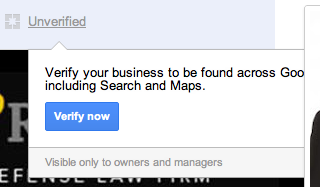
1. Login in as the manager for the Google+ Business page and make sure that all necessary fields are public. I just ran through this process for Moses and Rooth Attorneys at Law in Orlando. Click on the unverified icon to the immediate right of your business name. A warning will show if you neglected to make any of the required fields available for public view. Fix the non public fields by changing the visibility of the specific fields noted. (Not sure what is happening with the message being blocked- Google has noted that message being blocked is a known bug that is being fixed):
(click to view the rest)
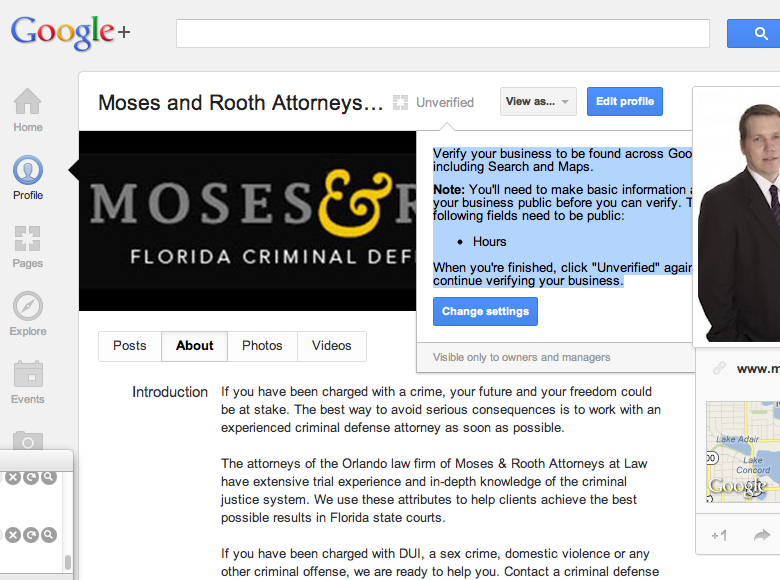
2. After you have made the appropriate field(s) public (or they already are) click on the unverified icon again and you will be presented with an opportunity to verify:
3. You are then offered likely choices for businesses to associate with your +Business Page (and no I do not yet know how an individual in a multipractioner firm is supposed to verify their +Local page although I suppose that it means creating an additional +Business Page):
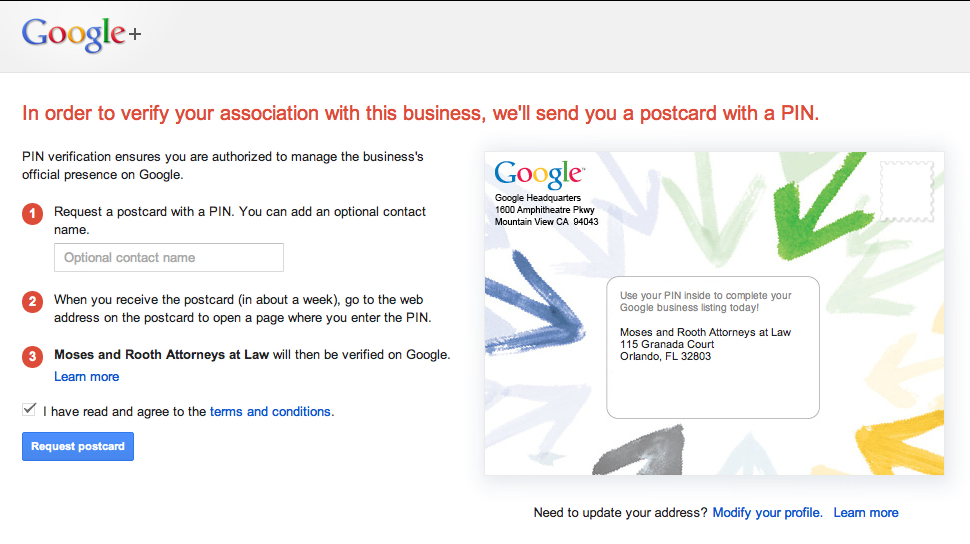
4. You will be asked to agree to the terms and are given the option of entering a contact name and modifying your listing data at that point:
5. Google will send you an actual envelope that is surprisingly well marked (so that it is unlikely to be thrown away- yea!):
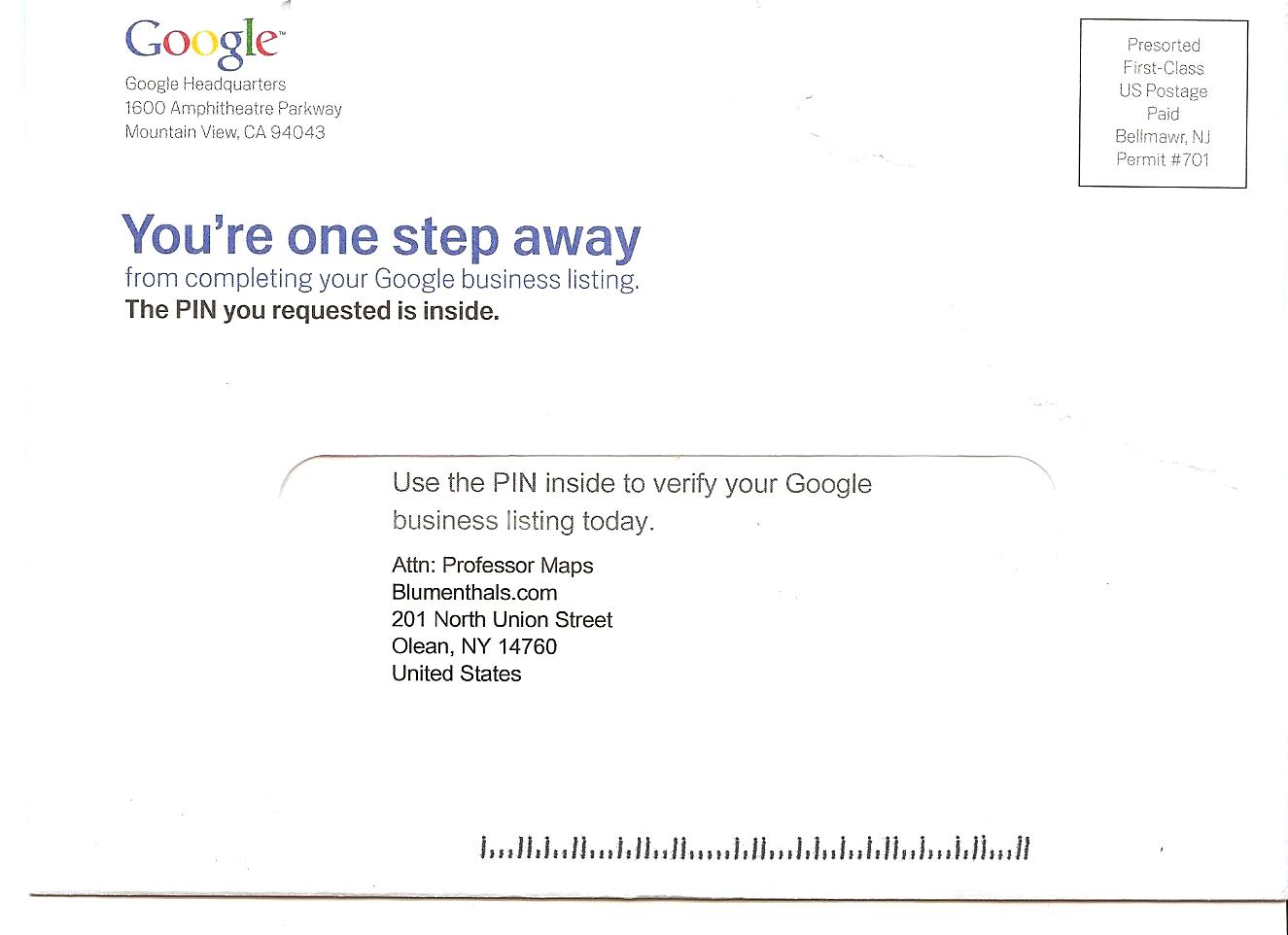
6. The card provides a pin and instructs you to goto google.com/local/verify/:
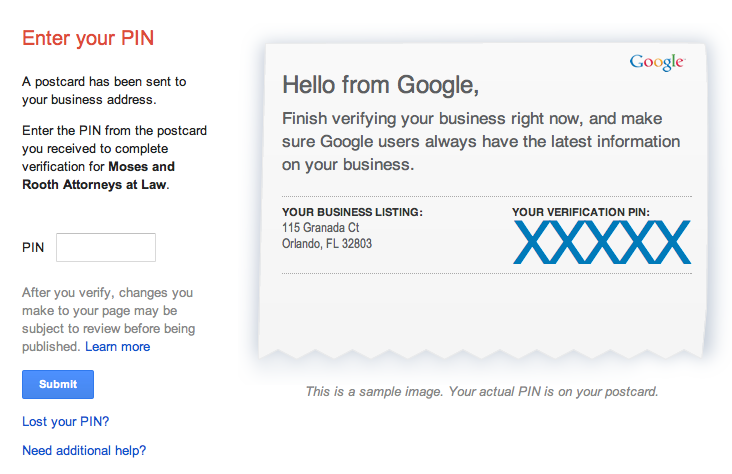
7. When you visit the google.com/local/verify/ page you are presented with the option to enter your PIN:
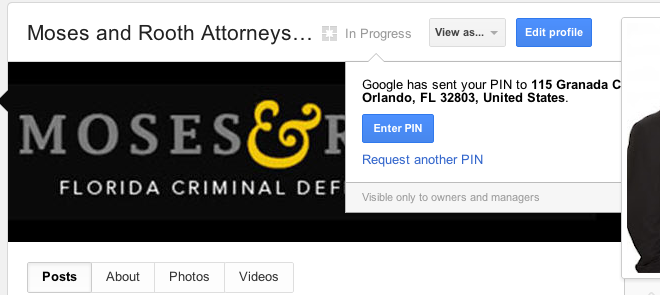
8. While waiting for the postcard the public view of the page the unverfied icon is no longer visible. To managers of the +Business page there is a note that the verification is pending.
9. Known gotchas…
- If you do not have a +Business page then you can’t start this process until you create one.
- If you have a +Business Page which doesn’t have a page category of Local can not be upgraded.
- According to poster Dan Rippon of Australia there is a bug whereby the postcard is missing the street address for those listings with their address hidden.
Update: Google has confirmed that the postcard verification DOES NOT SUPPORT service area businesses:
What about if I’m a service area business with hidden address?
The new verification process does not currently support service area businesses with hidden addresses.
Update: google has added these help files to the Google+ Business page support area:




Thank you so much for this information. I had been searching for this verification since I first heard about it. Your instructions were very clear and easy to follow. My postcard is in the mail now.
Comment by Tammy Doriot (1 comments) — August 3, 2012 @ 5:08 pm
Surprisingly easy. Now, for all those accounts with multiple locations
Comment by Zachary (24 comments) — August 3, 2012 @ 5:09 pm
Mike,
I have a few questions about this:
Can this only be done for ‘unverified’ G+ Business pages?
Also, I’m looking at my company’s G+ Business page and I don’t know if it was initially setup as a “page category of Local” (as you mentioned at the very end of your post)
How might I confirm what category my G+ Business page is in? I assume, by reading the comments on this page: http://www.socialmediaexaminer.com/how-to-set-up-a-google-page-for-your-business/ that it is not possible to change the category once you’ve already created the page… is that true?
Thanks
Russ
Comment by Russ Offord (4 comments) — August 3, 2012 @ 5:11 pm
Can this only be done for ‘unverified’ G+ Business pages?
Yes. If it were already verified and a Local page then it would have been done already in the trial last month.
The way to tell if a page is set up as a Local page is to view the about us page. If it has a red pin and local map it was set up as a page category of local.
It is apparently true for now that the category is not changeable.
Comment by Mike Blumenthal (1962 comments) — August 3, 2012 @ 5:36 pm
Mike,
Thank you so much for the time you’re putting in to create the blow-by-blow account of this big transition. I’m sure I’ll be pointing many people to this post in the next few weeks. Much appreciated!
Comment by MiriamEllis (636 comments) — August 3, 2012 @ 5:41 pm
@Miriam
Thank you
Comment by Mike Blumenthal (1962 comments) — August 3, 2012 @ 5:56 pm
Thanks Mike! Was waiting for Jade to confirm the link to the official Google help docs someone just posted at my forum, were the correct and updated help docs for this new option.
Just posted a link at my forum to THIS post because I’m sure YOUR step-by-step instructions are better than Google’s step-by-step instructions.
Comment by Linda Buquet (293 comments) — August 3, 2012 @ 6:16 pm
Is the dashboard going away? If so, any insights if the analytics data (impressions, actions, etc) will be accessible once this merge is verified?
Comment by Keenan (13 comments) — August 3, 2012 @ 6:20 pm
What will you recommend for a local business with several outlets – also in Google+ local. Wait until there is a support for this (maybe one Business Page for all), or create/link each outlets to separate Business Pages?
Comment by Morten Myrstad (1 comments) — August 3, 2012 @ 9:22 pm
@Linda
Thanks
@Keenan
The dashboard as you have known it and love it will remain live and can still be used to update basic listing information. I would imagine that it is next on the replacement list. There is a new bulk upload, new offer capability, new adwords express… I assume that there will be a new dashboard to tie that and additional functionality together again.
@Morten
The location is still at the heart of the algo so you will need one Google+ Business local page for each location. Thus if you have a few outlets you just need to go through this process for each location.
I assume that there will need to be some multitier and multi location management function at some point but for now it is a claim each location for itself proposition.
That means that folks doing bulk uploads will have to wait for another release for them to easily get control of their pages.
Comment by Mike Blumenthal (1962 comments) — August 3, 2012 @ 10:43 pm
@Mike if you go back through our email thread with Google today Jade said a couple times after you do the merge everything is managed in the G+ interface and the dashboard will be gone.
That’s the way I understand it anyway.
Comment by Linda Buquet (293 comments) — August 3, 2012 @ 10:59 pm
@Linda
That is definitely the way it will be. I am just not positive that it is the way it is now. For example there is no interface for categories.
Comment by Mike Blumenthal (1962 comments) — August 3, 2012 @ 11:06 pm
Hmm, I may have run into a snag… can anyone confirm?
As per the guidelines for this particular type of business, a client has their street address hidden.
Requesting the postcard picks up only the publicly available part of the address, not allowing for the addition of the street address; which unless they have a particularly friendly postman, isn’t likely to see the postcard delivered.
I guess a workaround would be to put the street address in the “optional contact name” box, although any numbers would need to be spelt out as they’re restricted from use.
Hopefully it’s an oversight that gets corrected in due course…
Comment by Dan Rippon (2 comments) — August 3, 2012 @ 11:23 pm
Oh that’s weird. No cats? Jade made it sound today like once you merged the G+ interface is all there is. Maybe I took it wrong.
So with your client you still have both dashboards and can make changes in either one?
I wish I had an account I could work on. I don’t think any of my previous Dental clients have a G+ page yet.
Comment by Linda Buquet (293 comments) — August 3, 2012 @ 11:52 pm
Thank you Mike. I suspect that eventually things like offers, adwords, and other functionality will be from buttons available on the page itself or maybe in a new tab. It doesn’t seem in Google’s best interest to reveal page stats.
So, there’s a …
Comment by Keenan (13 comments) — August 4, 2012 @ 1:22 am
sorry, there’s a new Adwords Express?
Comment by Keenan (13 comments) — August 4, 2012 @ 1:53 am
@Keenan
You may be right although I do think that they do have an interest in showing some stats… and that is to prove the value of the product. Great question though.
Adwords Express has improved a great deal although given the fact that it has been pulled from the interface it is basically hidden from view.
Comment by Mike Blumenthal (1962 comments) — August 4, 2012 @ 5:03 am
@Dan
That is a “gotcha”. I will attempt to confirm with Google but it would be a serious bug. (Also like throwing salt on the wounds after this recent fiasco).
Comment by Mike Blumenthal (1962 comments) — August 4, 2012 @ 5:07 am
@Dan, I don’t think it’s a problem. Google will send the postcard to the address in the account, not to whatever shows on their example widget.
The widget doesn’t show the 2nd address line either, but I think I remember this was also the case the last time we verified, yet it showed up just fine.
Comment by Keenan (13 comments) — August 4, 2012 @ 10:39 am
@Keenan
That makes sense. They wouldn’t want to expose the address inappropriately. I did ask them to make sure though.
Comment by Mike Blumenthal (1962 comments) — August 4, 2012 @ 10:45 am
Awesome instructions and images to make life easy! I went through the motions and made it to the end with out any bugs! thank you!
Comment by Marie (11 comments) — August 4, 2012 @ 12:00 pm
@Mike, do you anticipate that there will be a viable solution to remediate duplicate G+ page: https://plus.google.com/local/32803/s/moses%20and%20rooth
Comment by David Rodecker (16 comments) — August 4, 2012 @ 12:44 pm
Mike I’ll comment in the email thread with Google too, but FYI the same thing happened to me re hidden address.
I went to verify and I have my address hidden. I took screenshots and will probably post it over at my forum, because it’s going to confuse folks.
Verification process showed me a pic of the postcard and said – this is how it will look. It was addressed to Name, City with no address.
So if I were an SMB I would DEF think I would not get the mail.
Link under says address problem? Correct here. So I followed the instructions (as I would if I were an SMB that didn’t know better). Took me to profile. Changed address there. Went back to verify again. The postcard preview STILL only showed Name, City.
If I were an SMB at that point I probably would have gone to forum and said “the system is broken I can’t verify, no mailing address”.
Instead I hit submit anyway thinking it would come back with error saying address was missing, but it went through.
Then I think I hit back arrow in browser to take a screenshot and it took me to PIN screen and there said a postcard was sent to name + full address.
SO now (again pretending I’m an SMB who does not understand the importance of hiding address) – Now my address on my G+ profile is showing.
Would I think to go back and change it??? Doubt it.
Plus the G+ help docs on service area business say if you’ve hidden address on your Place page that setting will carry over to your new G+ page. BUT in this case if I don’t change address on G+ I wonder what will happen after they merge? Will it automatically hide it?
So ya the process needs tweaking and again I took screenshots and planned to post the process I went through on my forum when I get time. But pretty jammed up this weekend.
I’ll follow up on your email thread with Google and have them read my comment here.
Comment by Linda Buquet (293 comments) — August 4, 2012 @ 12:50 pm
Mike, Thank You!
After reading this post I immediatly went through the process and had a postcard sent to one of my locations.
I however was wondering about this: Could this verification actually effect ranking in a negative way?
I know that Google experimented with the merge of the Business Page and + Local Pages with some volunteers a month or so ago and was wondering if there are no unexpected bugs which could actually turn a page 1 ranking listing into a missing in action listing?
Jade actually warned the volunteers that this experiment is not for the weak at heart, is the system bug free now?
Does anyone have an example of a merged page which is Page 1 now or an opposite expample of a merged page that has lost position through this transition?
Comment by Michal (4 comments) — August 4, 2012 @ 2:00 pm
Michal
Bug free? This is Google. Google doesn’t do bug free. Release early and reiterate often means there will be bugs. The limited functionality offered up with this merge process does seem to work reasonably well.
On the several test listings that I tried it had no measurable impact in ranking. Nor should it.
Comment by Mike Blumenthal (1962 comments) — August 4, 2012 @ 2:03 pm
Why should this effect rankings negative?
I’m just waiting for the code.
Comment by Mark Wi (1 comments) — August 4, 2012 @ 2:17 pm
Mike,
Thanks for this great write up. My Google Plus business page is already verified but not linked to my Google local page. Do you have instructions to assist with that?
Thanks!
Kim
Comment by Kim (9 comments) — August 4, 2012 @ 3:38 pm
FYI All,
Jade edited original post and added an FAQ that addresses some common questions.
http://productforums.google.com/d/topic/business/cLdShAg9xYs/discussion
NOTE: Home-based or service area businesses with address hidden. You can’t upgrade yet. Mike and I found this out after emailing Jade this AM.
Don’t know why Google could not just put a notice at top of verification screen OR give an error and explain why instead of wasting our time.
(OR mention in the original announcement – given they know how many businesses are in this boat, based on other recent problems.)
I documented my experience above. I jumped through a bunch of hoops and it seemed to have worked. If I was an SMB I’d be sitting here waiting for my postcard, then complaining when it never came. Would have been nice if it was explained up front that it was not available for home-based businesses who are SOL once again! Salt in the wounds, like Mike said above!
Comment by Linda Buquet (293 comments) — August 4, 2012 @ 4:12 pm
Google has confirmed that the postcard verification DOES NOT SUPPORT service area businesses.
What about if I’m a service area business with hidden address?
The new verification process does not currently support service area businesses with hidden addresses.
Comment by Mike Blumenthal (1962 comments) — August 4, 2012 @ 4:28 pm
Unfortunatelly is not working for several countries in LatinAmerica.
Comment by Soluweb (1 comments) — August 4, 2012 @ 9:09 pm
As a service area business, would it work to unhide the address until verified, then go back and edit to hide the address later?
Comment by John Guild (1 comments) — August 5, 2012 @ 12:43 am
Dagnabbit!
I was one of those guys who volunteered for an early merge of my Google+ Local and Google+ Business pages, and I don’t know if you saw this or not, but all the fancy formatting you and I did for our pages is now gone. (Leo’s Pet Care: https://plus.google.com/b/108081775666322932523/108081775666322932523/about ~~ Barbara Oliver & Company https://plus.google.com/103156080483607740278/about?hl=en)
Both listings have been stripped back to bare bones.
Doesn’t even have hours of operation or nuthin’.
Even my website isn’t linked anymore. Complete reset.
Thoughts? Suggestions? Start over? Wait for stars to realign? Pull out hair?
Comment by Greg Magnusson (9 comments) — August 5, 2012 @ 8:57 am
Oh, one more thing – considering this blog post, I should point out that despite every other detail being wiped out, my page remains listed as a “verified local business”. At least ONE thing stayed the same.
Comment by Greg Magnusson (9 comments) — August 5, 2012 @ 9:01 am
@Greg
Good catch. This just happened. I was looking at Barbara’s page recently. Let me see what Google has to say.
Comment by Mike Blumenthal (1962 comments) — August 5, 2012 @ 10:15 am
Dagnabbit and Mike ,
I wonder if Google is ridding itself of categories and other elements from the old places page because the new Google+ Local allows for much more content.
It’s no longer necessary to select “Teeth Whitening Services” or “Cosmetic Dentistry” as categories because you can include them in the About Us description… Optimized content???
Just a thought – Not stating this as a fact
Comment by Zachary (24 comments) — August 5, 2012 @ 10:22 am
@greg
Interestingly it didn’t happen on all of my tests.
PBM Elder Law stayed intact as did Cut Loose Hair Salon. Both early testers.
Comment by Mike Blumenthal (1962 comments) — August 5, 2012 @ 10:26 am
Oh boy… Anchor text from a Google+ account.. I wonder if Google thinks that keyword rich link should exclude you from SERPS?
Comment by Zachary (24 comments) — August 5, 2012 @ 10:29 am
@Greg
I think that the content may have been “moderated” to exclude links.
Comment by Mike Blumenthal (1962 comments) — August 5, 2012 @ 10:41 am
@mike interesting theory!
Comment by Greg Magnusson (9 comments) — August 5, 2012 @ 11:00 am
@Zachary
Google is still showing the 5 categories from the dashboard but it is necessary to click on the categories to see them. It is not clear what Google’s intentions are vis a vis categories.
As to linked content from the about us, I don’t see that being used as a relevancy signal like categories. In fact I think that having too many links on a page may lead to the page being moderated.
Comment by Mike Blumenthal (1962 comments) — August 5, 2012 @ 11:00 am
Thanks for clarifying. It sounds like many are experiencing issues with categories (like the ability to change or add them) – that’s why I mentioned a “theory”
The anchor text links – I was joking more than anything. I chuckle a little every time I see keyword rich anchor text (i.e. PBM Elder Law). That is all.
Yeah, hopefully no one starts “stuffing” their Google+ pages with links.
Comment by Zachary (24 comments) — August 5, 2012 @ 11:08 am
Thank you for this wonderful post. You have answered questions that I’ve had for weeks.
All of our client’s google places listings were created a couple of years ago within one google account, by the business owner and they are doing quite well. Until I read this today, I ‘thought’ they were changed over to the google local. Our situation is that there is one company with several other local offices in other cities. Each of those cities have live original google places accounts that are connected to that owner’s account.
The owner also has a google profile, google + account, rel=author, a “page” that is his personal google plus page and another page that is laid out in what was ‘thought’ to be a google business page. As I mentioned, all the listings in the original google places (those originals) are connected to his account.
Before the recent google + and local changes, their offices created separate google and google + accounts and rel=author for all managers of their offices. Then, they created an additional page that gave their business details in their google + account for their respective cities office that was a part of their google + account. Again, this was before the recent changes of combining google + and google places.
If I am understanding this, we should create another page, a ‘local’ plus page for each office within the main owner’s google + account and verify those. Is that right?
Is the verification process and post card for the “new” google + local page only ? Will our present high ranking status remain in place for the original google places until we verify?
Comment by Mary (8 comments) — August 5, 2012 @ 11:32 am
@Zachary
I don’t think that there are issues within the dashboard are there? Businesses can still add categories. It just takes a week or more for them to show up on the Google+ local page.
As to anchor text links… PBM Elder Law is their DBA thus it is their listing name, business name and brand so it is somewhat different than a purely keyword rich link.
Although the About page does allow for links and for stuffing. Greg’s point that his and Barbara Oliver & Co Jewelry’s content had reverted could be related to the links issue. Both had 4 or 5 relevant links in the content on the page. That might very well have triggered Google’s moderation in an effort to prevent “stuffing”. I am not yet sure.
Comment by Mike Blumenthal (1962 comments) — August 5, 2012 @ 11:53 am
@Mary
If I was you, I’d hold off until Google allows the merging of Google+ Business Pages that were not created in the local category.
Otherwise you are going to have a lot of work ahead of you.
Russ
Comment by Russ Offord (4 comments) — August 5, 2012 @ 12:32 pm
Mary
This rollout is but one step of phased rollout towards a more finished local product. Should’s and shouldn’t depend on the value of the current solutions and your patience in waiting for the phases that will hopefully offer better solutions.
For example the current reverification process only works for a limited subset of businesses. If you are a service area business it doesn’t work and if you do bulk uploads it doesn’t work. It is ideal for a single location business that has learned about Google+ and has both a local listing and a G+ Business page. And Google has said that if you don’t do this step but have already verified your G+Local page, they will automatically upgrade your listing at some point in the future.
For everyone else the issue is force yourself into that model or wait for the final solution (pun intended).
Right now google+ business pages do not work that well with multi location entities because it is necessary to have a “social” page for each and every location whether you want to or not. I can’t imagine that will work for McDonald’s.
It might work for you. If it does go for it. If not wait for the next phase of the rollout.
I don’t see these claiming processes and interface updates to be related to ranking in any way. The issue is whether you will benefit from creating a Google+ Business page for each location and then re-verifying the local listing to go along with it.
Comment by Mike Blumenthal (1962 comments) — August 5, 2012 @ 12:41 pm
@Mike – I wasn’t referring to the name PBM Elder Law. I was referring to the anchor text link “estate planning” found on their profile page. I probably should’ve explained myself more clearly – but I thought that would’ve been obvious.
Comment by Zachary (24 comments) — August 5, 2012 @ 2:21 pm
@Zachary
Ah…. Gotcha. I created the page and from where I sit getting the customer back to relevant pages is the object.
But your point is taken. And given that Barbara Oliver, where I had 4 links, went into moderation google seems to not want it. We shall see.
Comment by Mike Blumenthal (1962 comments) — August 5, 2012 @ 2:40 pm
Hi Mike
Great stuff as usual. I’ve checked a couple of listings I have here in the UK. client 1 has 1 location and 1 G+ business page. Verification process as simple as your posts suggests.
Client 2 has 2 locations, 1 G+ business page. As of today, there’s no option to verify. What’s best practice in this situation? I can’t seem to find any documentation on how Google intends to handle businesses with multiple locations. (Here’s the link to the G+ business page if it helps – https://plus.google.com/115219497354568114260/about)
Comment by Gareth Rees (6 comments) — August 6, 2012 @ 3:49 am
@Gareth
There are two stumbling blocks still in the way for your multi location client.
1- It appears that when you created the original page you created a Brand page rather than a local page. There is no current way to change that. Once a brand page always a brand page. You would need to create additional Google+Business local pages for each location, individually verify and maintain eacy.
2. This points to the second missing feature. There is currently no way to associate multiple local pages with a single social (brand?) presence. It will obviously be necessary for Google to have such a feature at some point.
I would assume, but DO NOT KNOW, that they may implement some sort of Brand – location hierarchy where you could solve both of these problems but Google has not yet made those plans clear.
This is but one phase of the rollout. If I were you I might verify one location to get a sense of how it works but otherwise would probably wait for the full rollout.
Comment by Mike Blumenthal (1962 comments) — August 6, 2012 @ 7:52 am
Thanks for the info Mike, much appreciated. I think I’ll wait a little while and see how things process from Google. I’m sure it’ll be a bumpy ride as usual.
Comment by Gareth Rees (6 comments) — August 6, 2012 @ 7:56 am
@Leo
I have checked with google. They say to hold tight as this is a known issue. Hopefully it will return to your created state in a while.
Comment by Mike Blumenthal (1962 comments) — August 6, 2012 @ 7:58 am
That’s great help for all the webmasters, and business owners. Thank’s Mike, this is great one from you.
Comment by Amber (4 comments) — August 6, 2012 @ 9:11 am
Mike,
Any update from Google as to when something will be available for businesses with hidden addresses?
Comment by Justin Sous (17 comments) — August 6, 2012 @ 11:52 am
@Justin
No.
Comment by Mike Blumenthal (1962 comments) — August 6, 2012 @ 12:27 pm
Thank you very much Mike. We were also doing some research about this. I will get back to this post in case there are some updates. Some of our clients were asking us about this issue, so I will share this guide with them.
Thank you again.
Comment by Victor Velasquez (3 comments) — August 6, 2012 @ 1:25 pm
Hi Mike
what an informative post!
Has anyone in CANADA successfully merged a Google+ Business Page with a Google Plus Local Listing yet?
I have a verified Google Plus Business Page and a verified Google+ Local Listing (formally Place Page) for my Vancouver office, and I don’t see a way yet to merge them…?
They have not been ‘automatically’ merged either.
Comment by Andy Kuiper (232 comments) — August 6, 2012 @ 2:41 pm
@Andy
Was the Google Plus Business page a Brand page or a Local page? You can only merge the Google+ Business Local pages with your Google+local listing.
Comment by Mike Blumenthal (1962 comments) — August 6, 2012 @ 2:45 pm
Hi Mike
I checked to see if the Google+ Business Page was regarded as a “Local’ Page per a response I saw you posted earlier in this Post about seeing a map when on the About tab… I do not see a map on my Google+ Business Page (when on About tab). However I did set this Google+ Page up as a ‘Local Business’; how could I not?
So… I suspect I will have to wait for a later iteration to see what my options are “if” Google is seeing this Page as ‘not’ a Local Business.
I’m kinda frustrated about this dilema.
Comment by Andy Kuiper (232 comments) — August 6, 2012 @ 3:01 pm
Andy
As far as I know there are two reasons why the “verify” button doesn’t show. One is that the listing is in the process of being verified.
The other is that it was not created as a local page.
When I go to your G+ Business page, it does not appear to me that it was created as a local page but as a brand page.
If it were a local page, it would have a Map on it.
If when you created it you chose something other than Local Business or Place, the page is permanently not that. IE if you chose Company or Brand it the page would always be a Company or Brand page.
Comment by Mike Blumenthal (1962 comments) — August 6, 2012 @ 3:27 pm
If when you created it you chose something other than Local Business or Place, the page is permanently not that. IE if you chose Company or Brand it the page would always be a Company or Brand page.
It is possible that I set it up as a Company Page Mike
as I have two locations/offices; Calgary and Vancouver, and might not have wanted the Page focussed on one location over the other. Delete it and start again with two ‘Local’ Pages? What’s your best advice?
Thank goodness for resources like this blog… it’s saved me more than once LOL
Comment by Andy Kuiper (232 comments) — August 6, 2012 @ 3:41 pm
@Andy
The big hole in Google Plus Business pages right now is the inability to have a Brand/location parent/child relationship. I can’t imagine that McDonald’s wants to manage 15,000 social pages for each of their locations.
This rollout was tailored to a very specific subset of businesses… those with only one or two locations that want to do local social stuff. It doesn’t address service area businesses, bulk uploads, or all of those local businesses that don’t yet want to create a social presence in G+.
Google has noted that they will be providing an automatic verification for all of those local businesses that don’t yet want to create a social presence in G+ in the near future.
And they have implied that they will have a solution for the service area businesses.
They have not stated what and how they will be dealing with the bulk upload group. As you know they built a new bulk uploader in the recent past that is more visually consistent with the G+ environment even though it is bolted into the old dashboard.
Long story short… I beleive that they are coming up with a structure that will provide those bulk uploaders some sort of parent child (brand/local) construct that will facilitate this whole thing.
So as to what you should do? Its up to you. You can wait with no penalties and see what the next rollout is. And perhaps the one after that. That way you can be sure to be consistent with their requirements.
Or you can go ahead and create two new local pages and verify them. If you do that keep the Brand page because (in my gut) I gotta think that they will accomodate it.
Comment by Mike Blumenthal (1962 comments) — August 6, 2012 @ 3:58 pm
Hi Mike,
Any idea why I’m not seeing “Unverified”? I definitely never merged during beta testing and still have separate G+ Local and G+ business pages. Feels like I’m missing something….
Thanks,
Randy
Comment by Randy (21 comments) — August 6, 2012 @ 4:37 pm
@Randy
If when you created the +Business page, you chose something other than Local Business or Place, the page is permanently not that. IE if you chose Company or Brand it the page would always be a Company or Brand page.
Comment by Mike Blumenthal (1962 comments) — August 6, 2012 @ 4:57 pm
Mike, thank you so much for your clear take on the situation
I think Ill wait and see what transpires.
Comment by Andy Kuiper (232 comments) — August 6, 2012 @ 5:03 pm
Thanks Mike. Not sure why my second comment didn’t post (perhaps awaiting moderation), but I figured out what you’re describing… But the limitation is kind of annoying.
Comment by Randy (21 comments) — August 6, 2012 @ 5:23 pm
@Randy
I looked for a second comment but did not see it in pending nor in spam… sorry.
Please feel free to repost.
I recognize the annoyance. But the limitation may be a feature in the future. If my theory is true than at some point a brand page will become the host for any number of location pages…. we shall see.
Comment by Mike Blumenthal (1962 comments) — August 6, 2012 @ 5:32 pm
One Question.
How much does Google pay you to be there Customer Service / Product Support department.
geeesh… You do a lot on their behalf. Kudos and Gracias!
I guess it’s good you enjoy this stuff eh…
Zac
Comment by Zachary (24 comments) — August 6, 2012 @ 5:38 pm
I can’t thank you enough for this guide! Google changes so often these days, it’s tough to keep up with the ins and outs. The screenshots are a lifesaver. I’m hoping this “consolidation” will help, not hinder, businesses on Google Plus!
Comment by Jill Tooley (1 comments) — August 6, 2012 @ 5:43 pm
Yes, I agree with Zac, Google owes Mike big time… and has for years
Comment by Andy Kuiper (232 comments) — August 6, 2012 @ 6:56 pm
Hmmm, but what does one do when the Business Page is set up for the head office while the organisation has several branches, each with Google+ Local listings??
Exactly what Andy pointed out previously.
Comment by Greg (41 comments) — August 7, 2012 @ 4:49 am
Hello Mike,
Thanks for the great article!
How do you think we need to proceed with multiple locations. For example if you are owning more than 10 hotels, same brand – let’s say Holiday INN and you have submitted all 10 locations via bulk upload in Google Places and you have created 10 different G+ business pages. Do we have to verify them all one by one or there is a way to do them together like the bulk upload verification?
Thank you in advance for the answer!
Kind Regards,
Silvia
Comment by Silviya (5 comments) — August 7, 2012 @ 8:37 am
It’s rubbish the whole thing I just dont get a verification
Comment by mark shirley (1 comments) — August 7, 2012 @ 10:26 am
@David Rodecker
do you anticipate that there will be a viable solution to remediate duplicate G+ page
Sorry, your comment was in the filter. The issue of practice and practioner listings is not yet solved. These were all intentional on my part as the practitioner listings kept coming in whether I wanted them to or not. I went with the flow and tried to keep them from merging (with only partial success).
Comment by Mike Blumenthal (1962 comments) — August 7, 2012 @ 11:03 am
Mike,
Is the image in #5 the postcard you received for the verification of Google+ or was it from when you claimed your Places listing? if it is the one you received for verifying your Google + local page, how long did it take for you get it?
Marc
Comment by Marc Simcox (11 comments) — August 7, 2012 @ 11:16 am
@Silvia
At this point there is no mechanism to claim your G+Business page via bulk upload. I assume that feature will come but there is no telling when.
In the meantime you need to either wait or claim individually which for most bulk upload clients would be a major pita.
Comment by Mike Blumenthal (1962 comments) — August 7, 2012 @ 11:24 am
@greg
At this point you can wait to see if google addresses that use case or create and verify each location (a pain for sure)
Comment by Mike Blumenthal (1962 comments) — August 7, 2012 @ 11:25 am
@marc
I was involved in an early test of the verification system. Image #5 was from that test and it took 5 days.
Comment by Mike Blumenthal (1962 comments) — August 7, 2012 @ 11:30 am
Thanks Mike,
Thats exactly what I needed.
I send each of my clients an image of what to look for, I found it cuts down on items being thrown away because they thought it was junk mail and never bother to look.
Marc
Comment by Marc Simcox (11 comments) — August 7, 2012 @ 11:35 am
Hi Mike! Thanks for all that you do in helping us try to figure out the crazy world of Google Local.
I have a question – I have a Google+ Local page that I created for a client that I just verified (requested the postcard to be sent) – and it gave me the correct choice when it gave me the address and Google made Google Local+ page. The issue is the GAccount that I verified the Google+ page in is not the same GAccount that we use for the Google Local listing. Do you think that we will now be controlling the Google+ Local page (after it is verified) in the original G Account (Google Local Business Center) or the Google+ pages’ admin area?
I hope that was not totally confusing
Thanks so much for your time!
Comment by Celeste Schooley (2 comments) — August 8, 2012 @ 2:53 pm
Thanks Mike!
I am a little confused because with businesses that have multiple locations, they are still probably under one website – meaning that there is only one G+ page that publisher markup should go to, right? The main publisher.
So how does that work if you need a separate G+ Business page for each G+ Local listing, if you’re supposed to have one G+ Business page to point publisher markup to?
*confused* *annoyed*
Comment by Hannah (5 comments) — August 8, 2012 @ 3:11 pm
@Celeste
For clarity, I want to put forth some definitions.
Google+ Local page = Places listing, the unclaimable listing that Google moved into the Plus Environment created by an email account (but not necessarily a G+User)
Google+ Business Page = The page that an individual can create on behalf of a Brand, A local Business, a company or a sport team and created by a verified individual Google Plus user.
What just happened was that Google gave the owners of a Google+ Business pages the opportunity to reverify and claim a G+ local page from their local database. This page now effectively (and temporarily) will have two sources of owner data the Places dashboard and the G+Business page management area.
Google is ultimately moving towards, but is not there yet, all management being done in the G+ environment. And they prefer you to manage the content of the G+Business local page from G+. Unfortunately because the product is not yet finished (there is no equivalent of the dashboard yet) there are some things that can only be input via the Dashboard like categories.
So on a temporary basis you will be controlling the content of that listing from both accounts
Comment by Mike Blumenthal (1962 comments) — August 8, 2012 @ 3:50 pm
@Mike – Thanks sooo much for the clarification!
Comment by Celeste Schooley (2 comments) — August 8, 2012 @ 4:00 pm
@Hannah
At this point Google has not really provided a good solution for a multi location enterprise that wants one main social stream and one +Business page for their publisher authority.
This initial rollout addresses a very small segment of the businesses that are in Places/G+Local; A single location B&M business that has or wants to have a socail presence on G+ and doesn’t mind reverifying.
Everyone else (Service Area at Home Businesses, Bulk Uploaded Businesses, Businesses that don’t really want a social presence, Businesses that already verified and don’t want to do again and MultiLocation Businesses that want a single social presence) needs to wait for a future rollout to handle their use case.
Comment by Mike Blumenthal (1962 comments) — August 8, 2012 @ 9:06 pm
[...] (Maps & Local),Google Plus – Mike Blumenthal – 9:45 am The recent rollout of the ability to merge a G+ Business page and a G+ Local page was a significant sign post on Google’s way to integrating local into social. To [...]
Pingback by Google+ Business Pages: To Merge Or Not to Merge, That is the Question | Understanding Google Places & Local Search — August 10, 2012 @ 9:45 am
I just received my Verification PIN postcard to verify my Google + Business Page.
Unfortunately, when I either click the “In Progress” link on my Google + Business Page and then the blue Enter PIN button, I get an error, specifically:
“500. That’s an error.
There was an error. Please try again later. That’s all we know.”
I get the same error when attempting to visit the verification page directly that is provided on the postcard (www.google.com/local/verify).
I also get this error regardless of the browser I use (Chrome, Safari, or Firefox).
Any ideas?
Thanks for your support.
Comment by anon2828 (1 comments) — August 13, 2012 @ 10:35 pm
@anon
There were a number of 500 error reports in the forum today. I assume that it is a temporary brain fart.
Comment by Mike Blumenthal (1962 comments) — August 13, 2012 @ 10:55 pm
Mike, just a quick note to confirm that the 500 errors continue at google.com/local/verify
Comment by Steve Davis (4 comments) — August 14, 2012 @ 9:34 am
Hi Mike,
Thanks for the info. Just wondering if someone can help. We look after 40 franchise listings for a client whcih have all been claimed under the old Google places set-up.
I have established a G+ acount relating to that account.
However the listings no longer show images etc, just a basic description. Do you know if there is a solution currently avaialbe?
Regards,
Dean
Comment by Dean (7 comments) — August 15, 2012 @ 3:31 am
@Dean
I am not sure that I have enough information to advise you. If it is has been but a week then the photos from the Dashboard would not show. If the account has been suspended or the listing rejected in the dashboard then the images would not show. If the listings were bulk uploaded I think there is a bug on the images not showing (but not positive about that)… Images should show if you reclaim via + and upload images via Plus. The image upload in the dashboard is outdated and partially broken.
Comment by Mike Blumenthal (1962 comments) — August 15, 2012 @ 8:56 am
I have a client who wants to merge the two pages. He has a Google Business Photos tour on his Google+ Local page, will this still appear on the merged page? He’s concerned he may lose the virtual tour of his business. Thanks.
Comment by Abi M (1 comments) — August 15, 2012 @ 5:19 pm
@Abi
Yes it should.
Comment by Mike Blumenthal (1962 comments) — August 16, 2012 @ 9:32 am
Problem looming for Google+ businesses in Ireland. This last week they have decided to put the address in the Irish Language on the maps, even when you are using Google in the English Language. This is crazy as very few people in Ireland read Irish. So now my postcard has a mixed up Irish English address that looks incomprehensible. Even though the actual address is listed clearly in the info I submitted in the info about my business. I went around and around to try and correct this and gave up. Just hope the postman can figure out from our company name. Why does Google not apply commonsense? On Google Maps our location is in several different places and despite contacting Google there is nothing they can do. We are just one little computer repair shop in one location is Dublin. Thanks for your help.
Comment by Melanie (1 comments) — August 16, 2012 @ 1:20 pm
Mike, I have a client that has a Google local (places) listing. She also has a google plus personal profile. However she does not have a google plus business page. So do I need to create a google plus business page so that I can merge it with the google local listing? Or will Googe just create the final product even though there is no google plus business page?
Thanks so much for your help
Comment by Norm (2 comments) — August 20, 2012 @ 4:44 pm
@Norm
The answer is yes.
If you want to do it NOW, then you need to create the Google+ Business page (local) and then reverify. If you want to wait then Google will automatically create the final product for you.
Comment by Mike Blumenthal (1962 comments) — August 20, 2012 @ 6:26 pm
Hey Mike,
Thanks for the great blog post. Question for you, in your opinion, should we start moving clients over now and create them a Google + Business page to do the merge (all our clients already have a claimed Places page), or should we wait until Google gets their ‘stuff’ sorted out – seems to be a giant mess at the moment.
Even for our our company, we requested a PIN verification, and by the time it got to our office the ‘enter pin’ icon had been removed and we had to RE-request it again. No point in spending all this time if Google will eventually create the final product for us.
Comment by Andrew Forster (26 comments) — September 12, 2012 @ 12:33 pm
Andrew
As I have notedelsewhere it makes sense to merge in a very limited set of circumstances….you should be a single location and not a service area business. But it is not yet required.
There is little reason not to do it if you meet the above criteria. Everyone else should wait.
Comment by Mike Blumenthal (1962 comments) — September 12, 2012 @ 10:41 pm
One thing I noticed about this is that when you create a Google+ Business page it assigns it an “ID” number(the long number after plus.google.com and then when you verify it to your Google+ Local page, that “ID” becomes the same ID as the Business page now, and the Local page’s ID will forward to the Business page.
Not that big of a deal since it forwards, but if you record this information and make things like QR codes based against it, and its now forwarding to a new URL then something a future change might break this.
Marc
Comment by Marc Simcox (11 comments) — September 13, 2012 @ 9:51 am
Hi Mike,
to the question why I’m not seeing “Unverified”? you say: “when you created the +Business page, you chose something other than Local Business or Place”.
Another answer as is the case with my listing:
When I created my Google + business page (local business) I tempered with the address because the map link went to USA instead of Thailand and finally the map disappeared completely. Putting all the details back as originally the map never showed up again.
What you think in that scenario are the changes to ever see the “Unverified” sign? Is my listing now still a Local Business listing even I do not have a map on it?
cheeers Robert
Robert
Comment by Robert Klein (1 comments) — September 14, 2012 @ 10:45 am
It is located just to the right of the business name in a very light gray at the top of the G+ Page for business that you created with your G+ personal profile. If you look above at the Moses and Rooth example you can see it next to the name.
Note it is NOT on the G+Local page… ie the Place page that was automatically created.
Comment by Mike Blumenthal (1962 comments) — September 15, 2012 @ 8:33 am
[...] Mike Blumenthal – 8:42 am The initial rollout allowing single location businesses to merge their G+Local page into the fully social G+ Page for local, while very limited, has surfaced very few bugs. The [...]
Pingback by Google+ Pages For Local – Known Bugs & Quirks After the G+ Local Merge | Understanding Google Places & Local Search — September 19, 2012 @ 8:42 am
I received my Pin, followed the steps and the (in progress) link is not there to click..
Comment by Jeff (10 comments) — October 2, 2012 @ 11:17 pm
Hi,
The merge of a +Local Business page with the Places entry should only be attempted by a business with one Places entry.
Before trying you need to search in google maps by phone no and (category in/near location) and make sure you have only one result, which is clearly from the Places entry. I would also check in Google+ search.
If you do a merge with duplicates present whilst it may look OK when it pops up your business at merge time, it seems to then do the following action with one of the duplicates.
So far I have not seen Jade sort one of these problems out.
You will not see the verified icon in the resulting Google+ page in search.
Also when a non-merged Places entry Google+ page shows in search it will not have the red Follow button.
If you are a Service Area business with a hidden address it does/did work as the programming does not stop you doing it. The above caveat will apply.
If you have more than one Places entry trying a merge of a +Local Business page will cause an error. You should certainly check in Google+ search as well for other professional pages with your business name in.
And again I have not seen Jade sort any of these out.
Unless you are sure you have a clean Places entry, no duplicates, no recent move with a Closed search result in google maps, then I would hold off doing a merge.
Fortunately +es are not affecting search results and these merge mess ups do not appear to affect your search result.
Cheers. Andrew.
Comment by Andrew Huskinson (64 comments) — October 27, 2012 @ 11:19 am
@Andrew
Thanks for your suggestions. I think these were all covered in the posts referenced above as well: To Merge Or Not to Merge, That is the Question” and Google+ Pages For Local – Known Bugs & Quirks After the G+ Local Merge
Comment by Mike Blumenthal (1962 comments) — October 27, 2012 @ 3:10 pm
I have a client whose Google Places listing was put on pending, after he honestly reported his exact address. He’s in the category of people waiting for Google to come up with a fix to restore his account to the Google Places data base. I created a Google + page for him and we are waiting for verification. Google failed to recognize the phone number when I put it in the Google + application. The question is will the Google + page also be put on pending?
Comment by Boruch Fishman (12 comments) — October 29, 2012 @ 1:00 pm
Hi Mike,
I made a small mistake in naming my +Business Local page. I wonder what happens if I change my business name (XYZ co.) to (XYZ inc.) after entering the PIN I received. Would it become unverified again?
Comment by Reza (4 comments) — November 13, 2012 @ 2:06 pm
Mike,
Wondering what your thoughts are regarding following: Have several clients whose business listings (places/ unverified local+) were set up under one corporate gmail acct. about 4 years ago.
With the upcoming merge to google+ local, what do you advise?
Should nothing be done and let the merge happen automatically ( which would leave all of these clients still under the one gmail acct- and what implications could that have with any google+ social capabilities)
OR Should I try to set up individual business pages in google+ for each client… and can the existing places/local+ be verified under that new gmail acct?
Any thoughts would very much be appreciated
Comment by k Smith (1 comments) — November 20, 2012 @ 2:03 pm
@k smith
I would hands down NOT do anything and wait for Google to make clear their direction and product interfaces. I am not confident that the only choice will be a merged social page. I think that there will be other choices. Not every business listing needs a social presence and I think Google recognizes that.
There are still a number of bugs in the merge process as well as use cases that are not well served.
The only businesses that I would merge now are
1)Those that have a clear and present need for a social presence
2)Have only 1 or at most 2 location
3)Have absolutely NO problems with duplicates or merges
Even then though I would think twice about it.
Comment by Mike Blumenthal (1962 comments) — November 20, 2012 @ 3:03 pm
Mike,
Thank you for your quick response. And something I had not considered is OTHER choices. I did have a concern that the merge would happen and I would not be able to make any choice at all. My initial thought was to be proactive and try to separate these clients from the single acct. before the merge. Your thoughts have echoed others in that I should wait.
Thank you
Comment by k. Smith (1 comments) — November 20, 2012 @ 3:27 pm
Hi Mike,
Great post! Always appreciate your information and insights. It has helped me to really explode my business in the last 12 months by doing all of my own SEO.
Now question time
I jumped the gun and merged my Google+ page with my Google Local listing. The issue being there is a competitor with a very similar business name to me. Google is listing both my number AND theirs on my page. I’ve tried removing the incorrect number but it just keeps popping back up. Its a real pain not to mention frustrating. Any ideas on how to fix it?
Thanks again for a great blog – its really an invaluable resource for me.
Comment by Michael (24 comments) — November 21, 2012 @ 2:17 am
The hardest part we found while transitioning from Google Places to Google+ Local listings was the fact that we have 15 brands and had to go through this process individually for each location. Google takes there sweet time to get back to you and doesn’t always allow the changes. It can be frustrating.
Comment by PCD (1 comments) — November 26, 2012 @ 11:33 am
Something strange about verification process. A few of my clients clicked on “Verify” button. In one week after receiving the verification code, there is no “enter the code” button anymore. There is “Verify” button again!
Why is that? And this happened to at least 7 of my clients.
Very frustrating.
Comment by Greg (41 comments) — December 17, 2012 @ 6:59 pm
One more, 2 of my clients did the same process twice, and enter the code vanished the next day.
Comment by Greg (41 comments) — December 17, 2012 @ 7:18 pm
@Greg
There have been reports of both behaviors in the forums. On the latter issue of the listings vanishing, it could just need a rebuild of the index for the listing to come back. However there could be more serious issues at hand.
As to the first issue, given the bugs and the fact that a new dashboard is likely on the way, I have been recommending that most businesses NOT merge their listings yet.
Comment by Mike Blumenthal (1962 comments) — December 17, 2012 @ 10:27 pm
[...] the rollout of the G+ Local Social merge and bugs showing up when service area businesses attempted to hide their address, Google has said [...]
Pingback by Service Area Business with a verified social local Google+ page? Delete It | Understanding Google Places & Local Search — December 19, 2012 @ 7:41 pm
Thanks Mike, needed this!
Comment by Donovan (6 comments) — January 1, 2013 @ 9:35 pm
I created Google Plus accounts for my clients, who never had places. Goolgle places had a wonderful thing like statistics with impressions and keyword searches. The Google plus doesn’t have it. Is it possible to have the dashboard stats like the places used to have?
Thanks,
Comment by Greg (41 comments) — January 9, 2013 @ 11:03 pm
Also I tried to do the verification Google places with some clients, and after receiving the code. its still pending, strange… :0(
Comment by Greg (41 comments) — January 9, 2013 @ 11:04 pm
Hello,
What do I do when I receive pin but Google says it’s incorrect?
Thank you!
Comment by Nadina Bozova (1 comments) — January 15, 2013 @ 7:30 am
Mike,
Have there been any recent updates for merging pages w/o dropping your ranK? I’m guesssing because we’ve yet to see a new dashboard it’s probably smart to wait?
Comment by Bob Neufeglise (2 comments) — January 23, 2013 @ 10:37 am
Bob
There have been none. I recommend staying in the dashboard at this time.
Comment by Mike Blumenthal (1962 comments) — January 23, 2013 @ 10:49 am
Thanks for the prompt follow up Mike!
Comment by Bob Neufeglise (2 comments) — January 25, 2013 @ 1:25 pm
Thanks for the info.
I’ve also been having issues with the verification process. Very frustrating.
Comment by Miguel (2 comments) — February 4, 2013 @ 2:01 am
Hi Mike,
Back in August I merged my masonry Places listing with a Local G+ Page.
I wasn’t aware that only storefront businesses should do this until today.
Google hasn’t said anything but I’m guessing it’s just a matter of time before my Places/Page gets suspended.
The business has 400+ followers so I’d prefer not to just delete the page as indicated on a Google support page I read.
Do you know if it’s possible to unmerged the two?
Any advice on what I should do?
Thanks
Comment by Craig (4 comments) — March 7, 2013 @ 4:41 pm
@Craig
No
Comment by Mike Blumenthal (1962 comments) — March 7, 2013 @ 4:54 pm
Hi All,
I spotted a comment earlier in this feed stating that brand G+ pages cannot be merged with place G+ pages – does anyone know if this is still the case?
Many thanks,
Hannah
Comment by Hannah J (1 comments) — March 11, 2013 @ 11:05 am
Hannah
Brand pages can still not be merged with local pages. In fact at a recent presentations at LocalU, Joel Headley said that users should not merge their G+Local pages even with a local G+ Business page at this point as Google will be rolling out an automated way to do so.
Comment by Mike Blumenthal (1962 comments) — March 11, 2013 @ 11:24 am
Great article Mike.
We’re doing great with our reviews, adding several each month, but we just lost our pin in the map??? We went from having the A pin to NO pin. We’re located just outside the city limits but still have a mailing address from the city.
Does anyone know how to ask Google to restore our pin?
Thanks
Todd
Comment by Todd Breen (1 comments) — March 22, 2013 @ 6:53 pm
Ok, so what about those who already have separate Google+ business pages and Google Places listings?
Comment by Dan John (1 comments) — April 24, 2013 @ 10:42 am
@Dan
There are many possible combinations of having separate pages but for now Google is advising ALL listings with a Dashboard based listing to hold tight and NOT merge. But rather wait for G to upgrade the dashboard.
Comment by Mike Blumenthal (1962 comments) — April 24, 2013 @ 1:59 pm
Hi kids,
Have spent what feels like weeks trolling through line after line of ‘help’ but have no answer so I’m turning to you marvelous fellows…
Trying to verify business on Google+.
Sent for postcard.
Postcard Arrived.
Tried to enter PIN.
Got this note: You have no businesses pending verification for XXXXX
How hard can it be to get this sorted?
Comment by Rich (5 comments) — May 21, 2013 @ 2:48 pm
@Rich
Call Google Places for Business support and ask for help.
Comment by Mike Blumenthal (1962 comments) — May 22, 2013 @ 8:47 am